
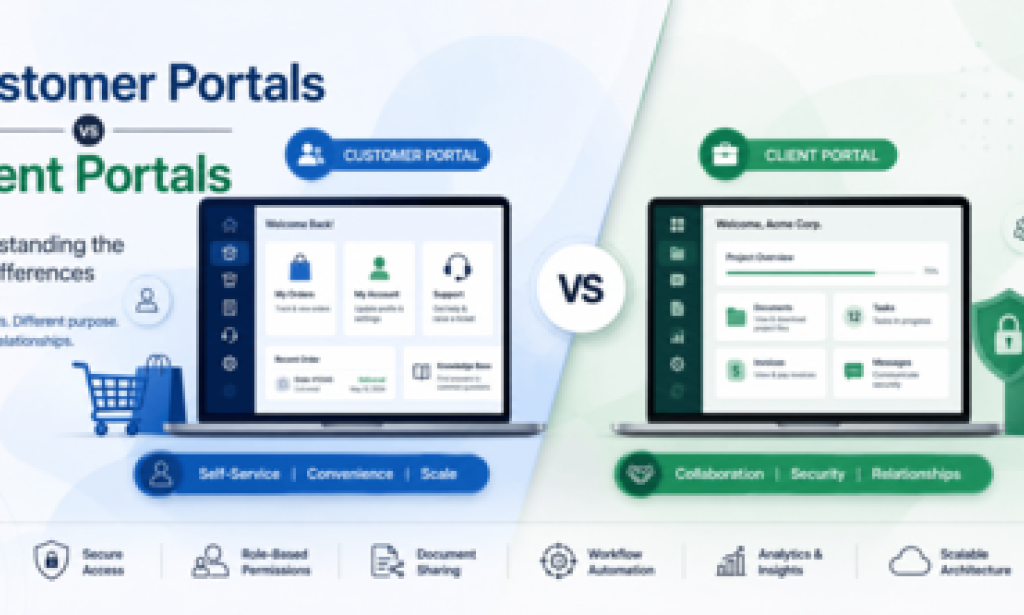
Businesses no longer compete solely on the quality of their products or services. Increasingly, they compete on the quality of the digital experiences they provide. Whether a customer wants to track an order, a corporate client needs to review confidential documents, or a partner expects real-time project updates, the portal through which those interactions occur often shapes the entire relationship.
In this environment, the terms customer portal and client portal are frequently used interchangeably. At first glance, both appear to describe secure online spaces where users log in to access information and complete tasks. Yet beneath the surface, they serve distinct strategic purposes, support different workflows, and are designed around very different user expectations.
Understanding these differences matters because the wrong portal architecture can create friction instead of efficiency. A self-service platform built for thousands of retail customers may struggle to support complex B2B collaboration, while a highly customized client workspace may become unnecessarily expensive and confusing when deployed for simple customer interactions.
This article explores where customer portals and client portals overlap, where they diverge, and how organizations can determine which approach aligns best with their business model and long-term digital strategy.
What Is a Customer Portal?
A customer portal is a secure digital environment that enables customers to interact with a business independently. Rather than contacting support teams for every question or transaction, users can log in to manage accounts, review purchases, access knowledge resources, update personal information, and receive assistance whenever they need it.
The primary objective is self-service. Organizations invest in customer portals to reduce operational overhead while improving convenience and consistency across the customer journey.
Modern customer portals commonly include features such as:
-
Personalized account dashboards
-
Order history and shipment tracking
-
Subscription management
-
Billing and payment records
-
Support ticket creation and monitoring
-
Knowledge bases and documentation
-
Product registration
-
Service requests
-
Secure user authentication
-
Notifications and communication preferences
The industries using customer portals span nearly every sector. In eCommerce, shoppers expect to review previous purchases and initiate returns without contacting customer service. SaaS providers use portals for license management, onboarding resources, and technical support. Telecommunications companies enable subscribers to monitor usage and pay bills, while banks offer secure access to statements, transactions, and account settings through digital interfaces.
One defining characteristic is scale. Customer portals are typically designed to accommodate thousands or even millions of users performing standardized interactions. As a result, simplicity, reliability, and performance often take priority over highly customized collaboration features.
Behind these user experiences, organizations frequently rely on modern web portal development services that integrate CRM platforms, payment gateways, identity providers, and customer support systems into a unified experience.
What Is a Client Portal?
A client portal serves a different purpose. Instead of emphasizing transactional self-service, it focuses on facilitating ongoing relationships between an organization and its clients.
A consulting firm may use a portal to exchange project documents, collect approvals, schedule meetings, and provide milestone updates. A legal practice may allow clients to review sensitive contracts securely. Accounting firms often centralize tax records, invoices, and financial reports within protected digital workspaces.
The emphasis shifts from efficiency alone to trust, collaboration, and confidentiality.
Common capabilities include:
-
Secure document sharing
-
Role-based access controls
-
Project timelines and deliverables
-
Approval workflows
-
Messaging and collaboration tools
-
Invoice management
-
Digital signatures
-
Confidential file storage
-
Client-specific dashboards
-
Activity tracking and audit logs
Client portals are especially prevalent in consulting, legal services, healthcare administration, financial advisory firms, marketing agencies, architecture, engineering, and enterprise B2B engagements where long-term relationships require ongoing coordination.
Unlike customer portals that often prioritize independence, client portals encourage interaction between both parties. The portal becomes an extension of the professional relationship rather than merely a support interface.
Customer Portal vs Client Portal: Key Differences
Although both platforms provide authenticated access to digital resources, their objectives differ significantly.
Primary Audience
Customer portals target consumers or end users seeking convenient access to products and services. Client portals support organizations or individuals engaged in deeper professional relationships involving ongoing collaboration.
Business Goals
Customer portals primarily reduce service costs, improve customer satisfaction, and enable scalable self-service. Client portals strengthen communication, streamline complex engagements, and build long-term trust.
Access Permissions
Permission models in customer portals tend to be standardized across broad user groups. Client portals frequently implement granular role-based access where executives, project managers, legal representatives, and administrators each receive different permissions.
Communication Style
Customer portals generally support transactional communication such as support tickets or automated notifications. Client portals often facilitate collaborative discussions, shared comments, approvals, and ongoing project conversations.
Shared Resources
Customer users usually access product information, invoices, FAQs, and account settings. Clients may exchange contracts, confidential financial documents, intellectual property, regulatory filings, and project deliverables.
Workflow Complexity
Customer interactions are relatively predictable and repetitive. Client engagements often involve multi-stage workflows requiring reviews, revisions, approvals, deadlines, and coordinated participation from multiple stakeholders.
Personalization
Customer portals personalize recommendations and account information based on user behavior. Client portals personalize nearly every workspace according to contractual obligations, project status, team composition, and business requirements.
Data Sensitivity
While customer portals certainly manage private information, client portals frequently store highly confidential business records that demand stronger governance, encryption, audit capabilities, and compliance controls.
Collaboration
Collaboration is optional in many customer portals but fundamental in client portals. Shared tasks, discussions, version-controlled documents, and milestone tracking become central features.
Integrations
Customer portals commonly integrate with CRM systems, eCommerce platforms, payment processors, and customer experience platforms. Client portals often connect with project management software, enterprise resource planning systems, accounting tools, document repositories, and internal collaboration platforms.
Compliance
Organizations handling healthcare records, financial reporting, or legal documentation frequently require enhanced compliance frameworks and audit capabilities within client portals to satisfy industry regulations.
Scalability
Customer portals prioritize horizontal scalability for large user populations. Client portals emphasize flexibility and customization while maintaining enterprise-grade performance.
Real-World Examples
Consider an online retailer serving hundreds of thousands of shoppers. Customers log in to track deliveries, manage returns, redeem loyalty rewards, and communicate with support representatives. Most interactions are independent and repeatable, making a customer portal the natural fit.
Now imagine a law firm representing corporate clients during mergers and acquisitions. Every engagement involves confidential contracts, privileged communication, document revisions, and approval workflows. A dedicated client portal provides the secure collaboration environment necessary for these high-stakes relationships.
A software development agency offers another example. While prospective users may access product documentation through a customer-facing knowledge base, enterprise clients receive project dashboards showing sprint progress, shared files, invoices, release schedules, and direct communication with development teams. This relationship-oriented workspace functions as a client portal.
Similarly, a financial advisory company may create secure digital spaces where investors upload tax documentation, review portfolio reports, exchange sensitive records, and approve strategic decisions. Strong identity verification and encrypted document sharing become essential components of the portal experience.
When Should a Business Choose a Customer Portal?
A customer portal is generally the better option when the business aims to empower users to solve common problems independently while serving large audiences efficiently.
Organizations often benefit from customer portals when they prioritize:
-
Order tracking
-
Subscription management
-
Product registration
-
Support ticket management
-
Knowledge base access
-
Billing inquiries
-
Service requests
-
Account management
-
Loyalty programs
-
Frequently repeated interactions
For SaaS providers, retailers, telecom operators, travel companies, utilities, and subscription businesses, these capabilities significantly reduce support costs while improving user satisfaction.
Many organizations investing in web application development services build customer portals as part of broader digital transformation initiatives designed to improve operational efficiency and customer experience simultaneously.
When Is a Client Portal the Better Choice?
Businesses should consider client portals when relationships involve continuous collaboration rather than isolated transactions.
Typical scenarios include:
-
Professional consulting engagements
-
Legal case management
-
Marketing campaign coordination
-
Software project delivery
-
Financial planning
-
Healthcare administration
-
Architecture and engineering reviews
-
Enterprise procurement
-
Managed IT services
These environments require confidential communication, collaborative document management, project visibility, milestone approvals, invoicing, and tailored experiences for different stakeholders.
The portal effectively becomes a shared workspace supporting long-term partnerships instead of simply delivering account information.
Can One Platform Support Both?
Increasingly, yes.
Modern organizations often operate hybrid platforms where customers and enterprise clients access different capabilities through the same underlying infrastructure. Identity management systems, modular portal architecture, and configurable permissions allow businesses to present distinct experiences without maintaining entirely separate applications.
For example, a technology vendor might allow all users to manage subscriptions through standard customer functionality while granting enterprise clients access to dedicated onboarding resources, implementation projects, secure documentation, and executive dashboards.
This unified approach simplifies maintenance, centralizes analytics, and reduces duplication while still delivering tailored experiences through role-based access controls.
Technical Considerations
Portal success depends as much on architecture as on interface design.
Authentication and authorization should enforce secure identity verification while ensuring users access only information relevant to their roles. Robust permission models become especially important in environments handling confidential business records.
API integrations connect portals with CRM systems, ERP platforms, payment processors, communication tools, analytics platforms, and document repositories, reducing manual work and improving data consistency.
Scalability should be considered from the beginning. Growing organizations often discover that initially simple portals evolve into mission-critical digital ecosystems supporting expanding user bases and increasingly sophisticated workflows.
Performance remains equally important. Slow-loading dashboards or unreliable synchronization undermine trust regardless of feature richness.
Cloud-native applications and resilient infrastructure improve availability while simplifying deployment across regions and devices. Responsive design ensures users can access services from desktops, tablets, and smartphones without sacrificing usability.
Many engineering teams leverage node js development services to build scalable backend APIs capable of handling concurrent requests efficiently, particularly when real-time updates or event-driven interactions are required. Others combine these capabilities with comprehensive full stack development services to create cohesive experiences spanning frontend interfaces, backend systems, integrations, and databases.
Operational maturity also plays a major role. Working with a capable devops development company helps automate deployments, strengthen monitoring, implement continuous integration pipelines, and reduce downtime through disciplined release management practices.
Analytics should not be overlooked. Monitoring user behavior, search activity, abandoned workflows, and engagement patterns provides valuable insights that guide future portal improvements.
Common Mistakes to Avoid
Several implementation pitfalls repeatedly appear across industries.
Treating every user identically often leads to poor experiences because different stakeholders require different permissions and workflows.
Weak permission models may inadvertently expose confidential information or create compliance risks.
Organizations sometimes overload portals with unnecessary features, producing cluttered navigation that discourages adoption rather than improving efficiency.
Poor integration planning forces users to duplicate data across disconnected systems, undermining productivity gains.
Security should never be an afterthought. Encryption, multi-factor authentication, audit logging, and regular vulnerability assessments are essential safeguards rather than optional enhancements.
Finally, many teams underestimate future growth. Portals designed only for current requirements may struggle when new business units, partners, or international users are added.
Future Trends
Portal technology continues to evolve alongside broader digital transformation initiatives.
Artificial intelligence is increasingly powering intelligent assistants capable of answering questions, surfacing relevant documents, and guiding users through complex processes.
Hyper-personalization will allow dashboards to adapt dynamically based on behavior, preferences, and contextual data.
Predictive support models may proactively identify issues before users submit tickets, reducing friction and improving satisfaction.
Workflow automation is becoming more sophisticated, eliminating repetitive manual approvals and accelerating business processes.
Low-code integration platforms enable organizations to connect disparate systems with less engineering effort, while unified digital ecosystems blur the traditional boundaries between CRM platforms, collaboration tools, and enterprise portals.
As organizations modernize infrastructure and embrace cloud-native architectures, portals are evolving from isolated applications into central hubs for digital collaboration and customer engagement.
Conclusion
Although customer portals and client portals share many technical foundations, they address fundamentally different business needs. Customer portals excel at enabling scalable self-service, reducing operational overhead, and improving everyday user experiences. Client portals prioritize collaboration, confidentiality, and long-term relationship management where personalized interactions matter more than standardized transactions.
For many organizations, the optimal strategy is not choosing one over the other but designing a flexible platform capable of supporting both through thoughtful architecture, role-based permissions, and seamless integrations.
Ultimately, the most effective portal is one that reflects how users actually work. By aligning technology decisions with business objectives, security requirements, and future growth plans, organizations can create digital experiences that strengthen trust, streamline operations, and remain adaptable as expectations continue to evolve.

You must be logged in to post a comment.