

What is cloud computing?
Cloud computing is a general term for anything that involves delivering hosted services over the internet. These services are divided into three main categories or types of cloud computing: infrastructure as a service, platform as a service, and software as a service.
A cloud can be private or public. A public cloud sells services to anyone on the internet. A private cloud is a proprietary network or a data center that supplies hosted services to a limited number of people, with certain access and permissions settings. Private or public, the goal of cloud computing is to provide easy, scalable access to computing resources and IT services.
Cloud infrastructure involves the hardware and software components required for the proper implementation of a cloud computing model. Cloud computing can also be thought of as utility computing or on-demand computing.
The name cloud computing was inspired by the cloud symbol that's often used to represent the Internet in flowcharts and diagrams.
How does cloud computing work?
Cloud computing works by enabling client devices to access data and cloud applications over the internet from remote physical servers, databases, and computers.
An internet network connection links the front end, which includes the accessing client device, browser, network, and cloud software applications, with the back end, which consists of databases, servers, and computers. The back end functions as a repository, storing data that is accessed by the front end.
Communications between the front and back ends are managed by a central server. The central server relies on protocols to facilitate the exchange of data. The central server uses both software and middleware to manage the connectivity between different client devices and cloud servers. Typically, there is a dedicated server for each individual application or workload.
Cloud computing relies heavily on virtualization and automation technologies. Virtualization enables the easy abstraction and provisioning of services and underlying cloud systems into logical entities that users can request and utilize. Automation and accompanying orchestration capabilities provide users with a high degree of self-service to provision resources, connect services and deploy workloads without direct intervention from the cloud provider's IT staff.
Types of cloud computing services.
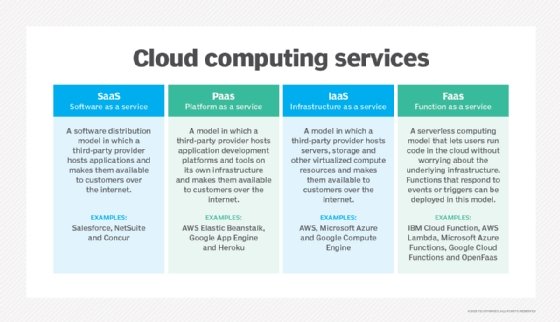
Cloud computing can be separated into three general service delivery categories or forms of cloud computing:
- IaaS. IaaS providers, such as Amazon Web Services (AWS), supply a virtual server instance and storage, as well as application programming interfaces (APIs) that let users migrate workloads to a virtual machine (VM). Users have an allocated storage capacity and can start, stop, access, and configure the VM and storage as desired. IaaS providers offer small, medium, large, extra-large, and memory- or compute-optimized instances, in addition to enabling customization of instances, for various workload needs. The IaaS cloud model is closest to a remote data center for business users.
- PaaS. In the PaaS model, cloud providers host development tools on their infrastructures. Users access these tools over the internet using APIs, web portals or gateway software. PaaS is used for general software development, and many PaaS providers host the software after it's developed. Common PaaS products include Salesforce's Lightning Platform, AWS Elastic Beanstalk and Google App Engine.
- SaaS. SaaS is a distribution model that delivers software applications over the internet; these applications are often called web services. Users can access SaaS applications and services from any location using a computer or mobile device that has internet access. In the SaaS model, users gain access to application software and databases. One common example of a SaaS application is Microsoft 365 for productivity and email services.
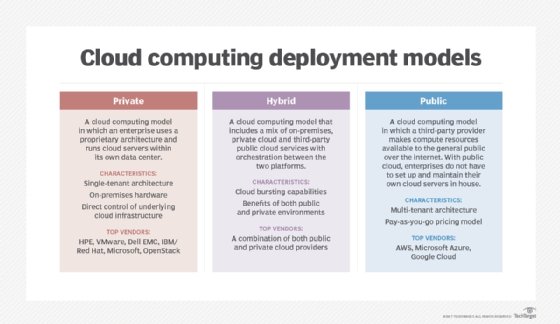
Cloud computing deployment models
Private cloud services are delivered from a business's data center to internal users. With a private cloud, an organization builds and maintains its own underlying cloud infrastructure. This model offers the versatility and convenience of the cloud while preserving the management, control, and security common to local data centers. Internal users might or might not be billed for services through IT charge back. Common private cloud technologies and vendors include VMware and OpenStack.
In the public cloud model, a third-party cloud service provider delivers the cloud service over the internet. Public cloud services are sold on demand, typically by the minute or hour, though long-term commitments are available for many services. Customers only pay for the central processing unit cycles, storage or bandwidth they consume. Leading public include AWS, Microsoft Azure, IBM, and Google Cloud Platform, as well as IBM, Oracle, and Tencent.
A hybrid cloud is a combination of public cloud services and an on-premises private cloud, with orchestration and automation between the two. Companies can run mission-critical workloads or sensitive applications on the private cloud and use the public cloud to handle workload bursts or spikes in demand. The goal of a hybrid cloud is to create a unified, automated, scalable environment that takes advantage of all that a public cloud infrastructure can provide, while still maintaining control over mission-critical data.
In addition, organizations are increasingly embracing a multi-cloud model or the use of multiple IaaS providers. This enables applications to migrate between different cloud providers, or to even operate concurrently across two or more cloud providers.
Organizations adopt multi-cloud for various reasons. For example, they could do so to minimize the risk of a cloud service outage or to take advantage of more competitive pricing from a particular provider. Multi-cloud implementation and application development can be a challenge because of the differences between cloud providers' services and APIs.
Multi-cloud deployments should become easier, however, as providers' services and APIs converge and become more standardized through industry initiatives such as the Open Cloud Computing Interface.
A community cloud, which is shared by several organizations, supports a particular community that shares the same concerns -- e.g., the same mission, policy, security requirements, and compliance considerations. A community cloud is either managed by these organizations or a third-party vendor and can be on or off-premises.
Characteristics and advantages of cloud computing.
Cloud computing has been around for several decades now, and today's cloud computing infrastructure demonstrates an array of characteristics that have brought meaningful benefits for businesses of all sizes. Some main characteristics of cloud computing are the following:
- Self-service provisioning. End users can spin up compute resources for almost any type of workload on demand. An end user can provision computing capabilities, such as server time and network storage, eliminating the traditional need for IT administrators to provision and manage compute resources.
- Elasticity. Companies can freely scale up as computing needs increase and scale down again as demands decrease. This eliminates the need for massive investments in local infrastructure, which might or might not remain active.
- Pay per use. Compute resources are measured at a granular level, enabling users to pay only for the resources and workloads they use.
- Workload resilience. CSPS often implement redundant resources to ensure resilient storage and to keep users' important workloads running -- often across multiple global regions.
- Migration flexibility. Organizations can move certain workloads to or from the cloud -- or to different cloud platforms -- as desired or automatically for better cost savings or to use new services as they emerge.
- Broad network access. A user can access cloud data or upload data to the cloud from anywhere with an internet connection using any device.
- Multi-tenancy and resource pooling. Multi-tenancy lets numerous customers share the same physical infrastructures or the same applications yet still retain privacy and security over their own data. With resource pooling, cloud providers service numerous customers from the same physical resources. The resource pools of the cloud providers should be large and flexible enough, so they can service the requirements of multiple customers.
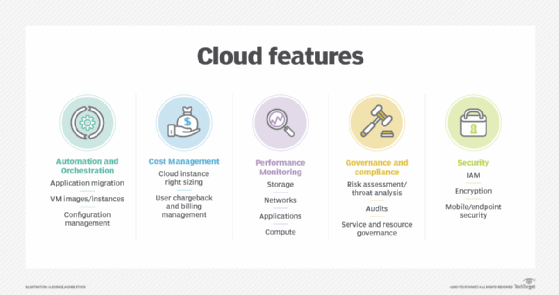
These characteristics support a variety of important benefits for modern business, including the following:
- Cost management. Using cloud infrastructure can reduce capital costs, as organizations don't have to spend massive amounts of money buying and maintaining equipment. This reduces their capital expenditure costs -- as they don't have to invest in hardware, facilities, utilities or building large data centers to accommodate their growing businesses. Additionally, companies don't need large IT teams to handle cloud data center operations because they can rely on the expertise of their cloud providers' teams. Cloud computing also cuts costs related to downtime. Since downtime rarely happens in cloud computing, companies don't have to spend time and money to fix any issues that might be related to downtime.
- Data and workload mobility. Storing information in the cloud means that users can access it from anywhere with any device with just an internet connection. That means users don't have to carry around USB drives, an external hard drive or multiple CDs to access their data. Users can access corporate data via smartphones and other mobile devices, enabling remote employees to stay up to date with co-workers and customers. End users can easily process, store, retrieve and recover resources in the cloud. In addition, cloud vendors provide all the upgrades and updates automatically, saving time and effort.
- Business continuity and disaster recovery (BCDR). All organizations worry about data loss. Storing data in the cloud guarantees that users can always access their data even if their devices, e.g., laptops or smartphones, are inoperable. With cloud-based services, organizations can quickly recover their data in the event of emergencies, such as natural disasters or power outages. This benefits BCDR and helps ensure that workloads and data are available even if the business suffers damage or disruption.
Disadvantages of cloud computing
Despite the clear upsides to relying on cloud services, cloud computing carries its own challenges for IT professionals:
- Cloud security. Security is often considered the greatest challenge facing cloud computing. When relying on the cloud, organizations risk data breaches, hacking of APIs and interfaces, compromised credentials and authentication issues. Furthermore, there is a lack of transparency regarding how and where sensitive information entrusted to the cloud provider is handled. Security demands careful attention to cloud configurations and business policy and practice.
- Cost unpredictability. Pay-as-you-go subscription plans for cloud use, along with scaling resources to accommodate fluctuating workload demands, can make it tough to define and predict final costs. Cloud costs are also frequently interdependent, with one cloud service often utilizing one or more other cloud services -- all of which appear in the recurring monthly bill. This can create additional unplanned cloud costs.
- Lack of capability and expertise. With cloud-supporting technologies rapidly advancing, organizations are struggling to keep up with the growing demand for tools and employees with the proper skill sets and knowledge needed to architect, deploy, and manage workloads and data in a cloud.
- IT governance. The emphasis on do-it-yourself capability in cloud computing can make IT governance difficult, as there is no control over provisioning, d e provisioning, and management of infrastructure operations. This can make it challenging to properly manage risks and security, IT compliance and data quality.
- Compliance with industry laws. When transferring data from on-premises local storage into cloud storage, it can be difficult to manage compliance with industry regulations through a third party. It's important to know where data and workloads are actually hosted in order to maintain regulatory compliance and proper business governance.
- Management of multiple clouds. Every cloud is different, so multi-cloud deployments can disjoint efforts to address more general cloud computing challenges.
- Cloud performance. Performance -- such as latency -- is largely beyond the control of the organization contracting cloud services with a provider. Network and provider outages can interfere with productivity and disrupt business processes if organizations are not prepared with contingency plans.
- Building a private cloud. Architecting, building and managing private clouds -- whether for its own purpose or for a hybrid cloud goal -- can be a daunting task for IT departments and staff.
- Cloud migration. The process of moving applications and other data to a cloud infrastructure often causes complications. Migration projects frequently take longer than anticipated and go over budget. The issue of workload and data repatriation -- moving from the cloud back to a local data center -- is often overlooked until unforeseen cost or performance problems arise.
- Vendor lock-in. Often, switching between cloud providers can cause significant issues. This includes technical incompatibilities, legal and regulatory limitations and substantial costs incurred from sizable data migrations.
- (Source: techtarget.com)

You must be logged in to post a comment.