

WhatsApp is all set to launch a handful of new features this year. The company has already been testing some of these features on beta users, and it won’t be long before they are rolled out for all. The WhatsApp new features 2023 list is likely to include a screen lock for the desktop app, view once text, companion mode, a new interface for Android and more. In this article, we have compiled a list of new WhatsApp features launched or expected to launch in 2023.
WhatsApp features launched in 2023
Here are the WhatsApp features that are now live in the stable version of the app.
Chat lock
You no longer need to archive chats to hide them from the chat feed on WhatsApp. The messaging is rolling out a new “Chat lock” feature to hide single chats on your Android phone and iPhone. And you will need to unarchive chats to use this feature, as these conversations live under a hidden “Locked chats” section.

To ensure the maximum privacy of users’ chats, WhatsApp has rolled out a chat lock feature for Android and iOS that allows you to add a fingerprint lock or Face ID, in the case of an iPhone to private and group chats. To enable chat lock, here’s what you need to do:
- Head over to the profile’s info screen
- Scroll down to find the ‘chat lock’ option.
- Simply tap on it and enable the feature on the next screen
All the locked chats will be moved to a secure folder which can be accessed by swiping down on the Chats screen.
Editing messages

Just like Telegram, WhatsApp users will now be able to edit sent messages. This can come in handy to rectify or modify the text of the message. But there’s a catch. A message can only be edited within the first 15 minutes of sending it and an ‘edited’ text will be specifically mentioned under those messages. Here’s how to edit a sent chat message:
- Tap and hold on the message you wish to edit
- Now select the ‘Edit’ option from the 3-dot menu
- Make the changes to the text
- Lastly, hit the ‘tick’ option to finalise the changes
Status link previews

When posting a link on status, WhatsApp will now automatically add a preview image by fetching the thumbnail or featured image from the URL. This makes allows the viewers to get the context of the URL beforehand.
Share high-quality images
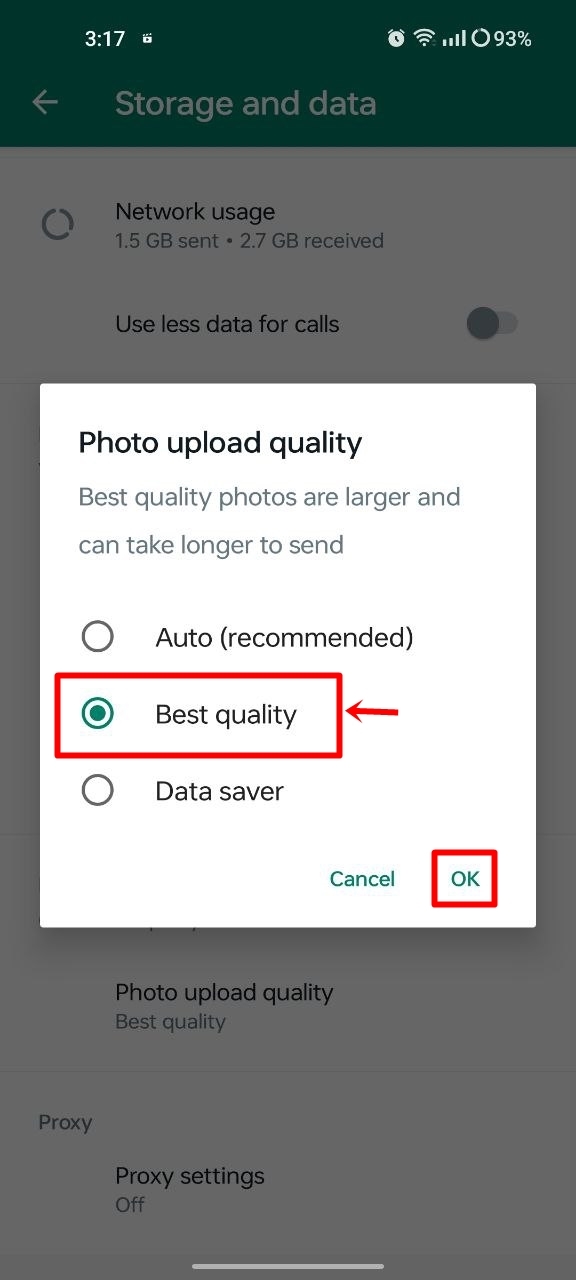
Sending images on WhatsApp tends to degrade the photo quality due to compression. To avoid this, the messaging platform has rolled out a new option under the ‘Storage and data’ section called ‘Photo upload quality’ in the Settings that lets users opt for the best possible upload quality for images.
Picture-in-Picture for video calls on iOS
WhatsApp users on Android have been enjoying video calls in Picture-in-Picture mode for well over a few months. The same functionality has arrived on iPhones which allow users to browse through other apps while minimising the video call into a small interface that can be dragged and placed anywhere on the screen. With PiP for video calls enabled, users will be able to multitask with ease.

You must be logged in to post a comment.