

At Google I/O, we got a fresh and detailed look at Android 13. The follow-up to Android 12 was first announced back in February and is currently in beta (here's how you can download it now). Google's new operating system will debut to the public this fall with more Material You personalizations, increased tools for privacy and security, more RCS messaging support, a revamped Google Wallet and better integrations with Chromebooks, watches, TVs, cars and smart home devices. The new software makes Android and Google's vast software ecosystem more competitive with Apple's wide portfolio of software and services. The proof is in the numbers.
For the first time ever, Google shared the number of Android phone activations, which in 2021 exceeded 1 billion devices. And there are more than 3 billion active Android devices monthly according to Sameer Samat, vice president of product management for Android and Google Play.
Those statistics, combined with things like Samsung offering four years of major Android OS updates, put Google in a unique position. It has to support a diverse array of old and new phones as well as tablets and foldables. Luckily, Android 13 is proof that Google is ready and eager to keep its crown jewel OS customizable and up to date while giving Android phone owners a more seamless experience across multiple devices. Some of the features Google highlighted are improvements to existing features or support for features in more countries.
Android 13 is currently in beta. For more information check out Google's Android Beta website.
End-to-end encryption for RCS group chats in Messages
Google worked with carriers and phone manufacturers over the last several years to roll out Rich Communication Services as a feature-rich alternative to SMS and MMS text messaging. This provides support for high-quality photos, messaging over Wi-Fi, a better group messaging experience and typing indicators, which let you know when someone is typing. The app already supports end-to-end encryption for one-to-one conversations automatically, and support for encrypted group chats will roll out later this year.
End-to-end encryption for group conversations is coming to Google Messages later this year.
GoogleGoogle notes that its RCS-powered Messages app -- the default texting app on many Android phones -- already has half a billion monthly active users on Android phones. While the RCS standard could eventually become universal, for now it remains unsupported on iOS and other phone operating systems.
Google Wallet and Wear OS
Google Wallet, which originally debuted in 2011, gets a number of updates and new functionality. Google Wallet can store digital versions of your essential documents, including payment cards, transit passes, office badges, vaccine records, car keys, boarding passes and student IDs. The idea is to provide a faster, more secure alternative to physical cards. Google is working with US states and international governments to support digital IDs, something Apple Wallet started to support in several US states back in March.
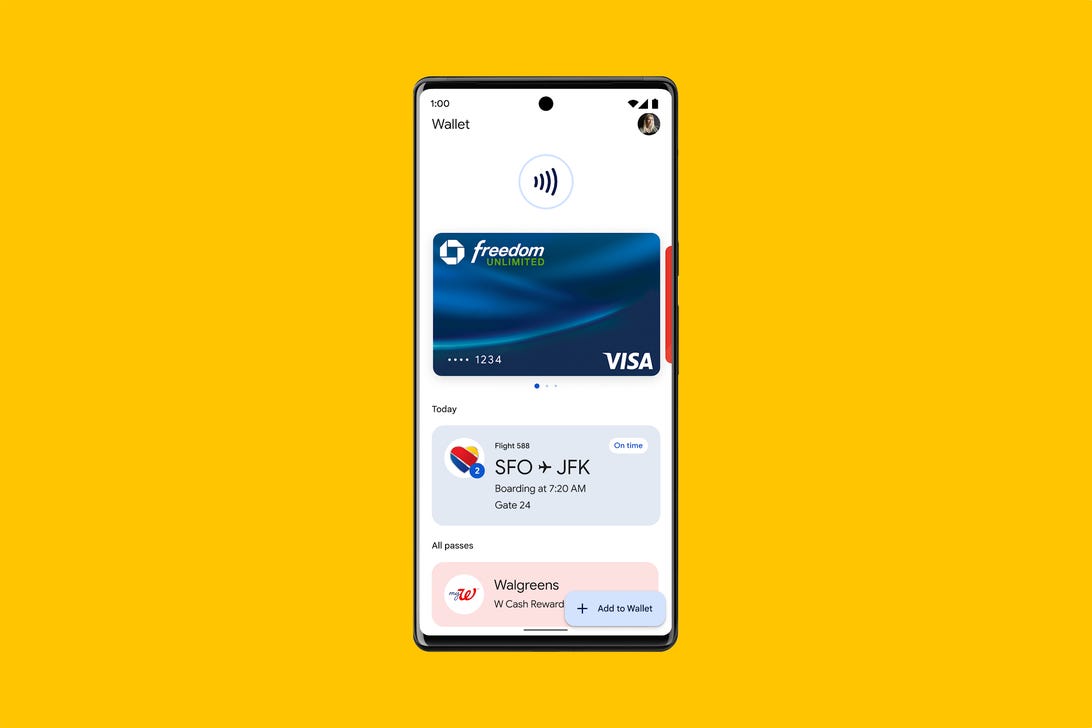
Google Wallet stores your data and cards securely and locally on your device.
GoogleGoogle Wallet will also allow you to share a digital card over either NFC or a QR code, which could be a faster way to share a card's information instead of physically handing your phone over to the person checking it.
Google Wallet also supports integrations with other apps that you can opt into. For example, if you have a transit card in Google Wallet, your card and balance will automatically show up in Google Maps when you search for directions. That way, if your balance is low, you can add more money for the fare before you arrive at your station or stop.
In terms of controlling your privacy, Google Wallet stores everything securely on your phone and doesn't share data with Google services.
Later this summer more than 40 countries that currently use Google Pay will be upgraded to Google Wallet. The exceptions are India, which will still use Google Pay, and the US and Singapore which will have both Google Wallet and Google Pay. Any device running Android 5 (Lollipop) or Wear OS will support it.
Emergency SOS is coming to Wear OS
When there's an emergency, our phones become even more vital. As part of Android 12, Google rolled out Emergency SOS which lets you get help, contact a trusted person and share your emergency information without unlocking your phone. Google is working to bring Emergency SOS to Wear OS.
As Wear OS watches from Fossil, Montblanc, Mobvoi and others start to roll out later this year, one feature they will all share is Emergency SOS.
GoogleEmergency Location Services, which is already built into Android, helps first responders find you when you call for help. ELS is now available to more than 1 billion people worldwide.
Early Earthquake Warnings via Android are already in place in 25 countries, and this year Google will launch them in more high-risk regions around the world. In places that don't have official early warning systems, Android can crowdsource indications of an earthquake from phones. When devices first detect waves generated by quakes, Google analyzes the data from phones and sends an early warning alert to people in that area.
Android 12L and the future of tablets and foldables
Google says that there are 275 million active users on large screen devices such as tablets and foldable phones. In March, Android 12L launched to help developers design apps for these larger screens. Android 13 continues where 12L left off and introduces better multitasking from the toolbar for split screen apps as well as support and optimizations for more than 20 Google apps including YouTube Music, Google Maps and Google Messages.
More Material You
One of the most obvious changes in Android 12 was Material You. Android essentially adapts the way your home screen and app icons look based on colors found in your wallpaper image. For Android 13, Google is introducing premade color sets for those who want something a little different. You choose the color scheme and it'll be applied across the entire OS.
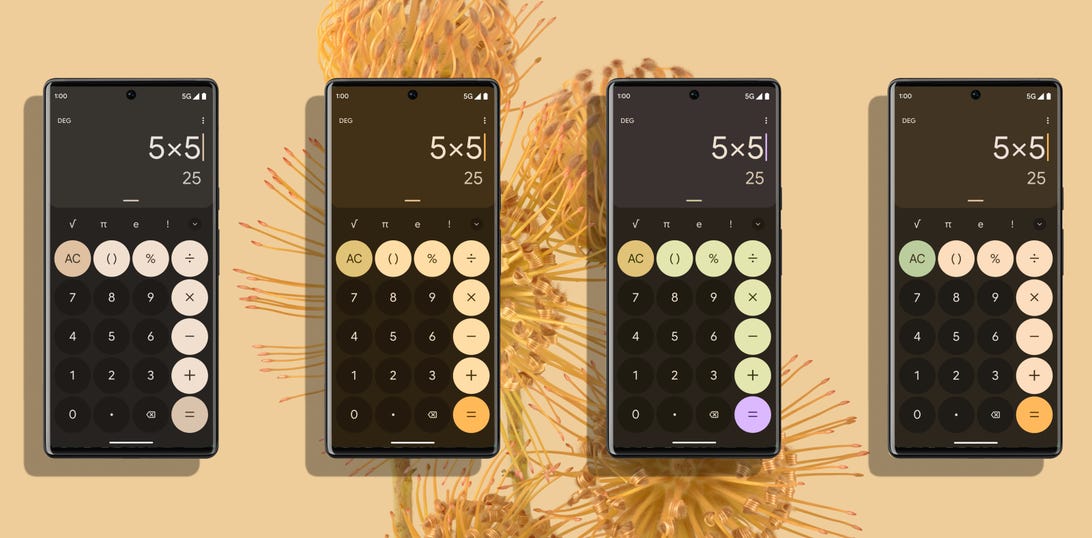
Android 13 has new color variant sets to give you more control over the way your phone looks.
GoogleThemed icons will no longer be limited to system apps. There's now a toggle in Settings that lets you turn themed icons on for all apps on your home screen.
Media controls also get a boost from Material You. When you're listening to music, the player window will adopt the color of the album artwork. There's also a new waveform progress bar that moves along to the audio.
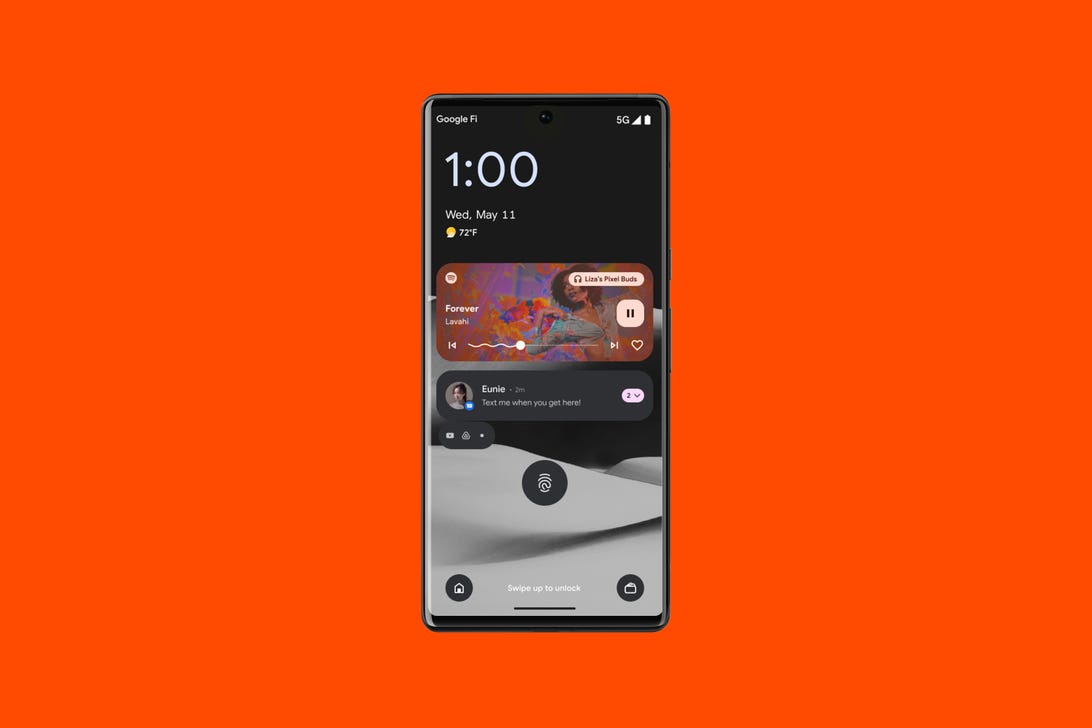
In Android 13, the media player controls will use a color from the album artwork for whatever you're listening to.
GoogleBetter privacy and security features
The App Language Settings now allows you to set different default languages for different apps. For example, your bank app can be set to English while your messaging app is in Hindi. Like the cameras on the Pixel 6 and Pixel 6 Pro, this is another example of Google being more inclusive and equitable with its software and design.
The Android Photo Picker adds a great privacy feature that originated in iOS: You can limit which photos and videos an app has access to. Instead of granting an app access to your complete photo library, you can choose specific images for that particular app.
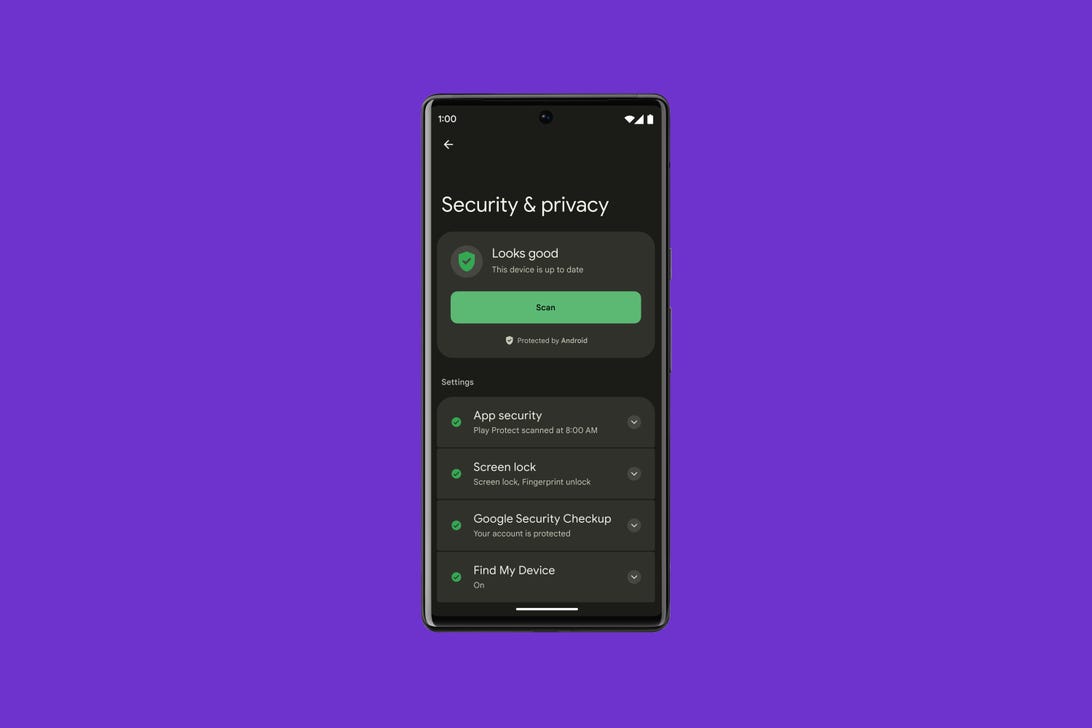
Android 13 will bring a new Security and Privacy page to Settings complete with a color-coded status showing how secure your phone is.
GoogleAndroid already notifies you when an app accesses your copy and paste clipboard. But Android 13 goes even further and automatically deletes your phone's clipboard history after a short period of time.
Later this year, Google will add a unified Security and Privacy settings page that puts all your phone's data privacy and security front and center. There will be a color-coded indicator showing your safety status and offering guidance to make your phone more secure.
Android 13 works better with your other devices
Google says the average US household has 20 connected devices. Earlier this year Google revealed its vision for how Android will work better with your TV, cars, speakers and laptops. Android 13 will support fast pairing for setting up new devices with your phone, automatic audio switching between devices for your headphones and copy-pasting between devices. It'll also let you stream messages and other apps from your phone to your computer.
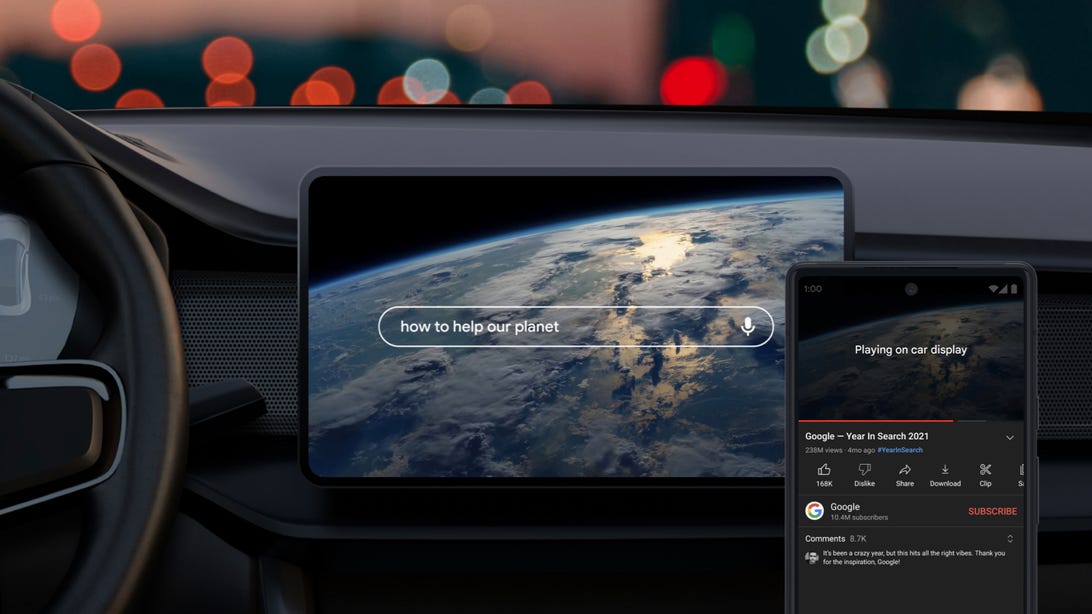
Chromecast is coming to cars.
GoogleThe Chromecast will support more devices from companies such as Bose, TCL, Sony, Vizio and LG. It will also extend casting capabilities to new products, such as to Chromebooks and even your car.
Wear OS has new apps from Spotify and Adidas. It will support turn-by-turn directions for biking and walking using haptic feedback, like the Apple Watch does.
The Google Play Store gets a visual overhaul. The app looks cleaner. The store is easier to navigate and apps are easier to find.
A big yearly Android update vs. smaller regular updates
Android 13 brings more functionality, security and privacy to your phone. And while yearly major Android updates aren't going anywhere, Google's made it clear that features such as Google Wallet and RCS messaging are likely to be updated as needed across devices. This could be particularly beneficial for phones that might not receive Android 13, but will still get the improvements from updates to the Wallet and Messages apps. I'm excited to try Android 13 out and see what the final version looks like later this year.


Google I/O 2022: Every New Device and Announcement
From Android 13 to the upcoming Pixel Watch, here's what Google unveiled at its annual developer conference.


Google I/O, the company's annual conference for developers, kicked off for 2022 with the usual keynote -- in person for the first time in three years -- hosted by CEO Sundar Pichai. During the keynote Google treated us to updates about the next version of its operating system, Android 13, and the company launched the Pixel 6A phone, Pixel Watch and Pixel Buds Pro earbuds. We also had teasers for a Pixel Tablet and Pixel 7 and 7 Pro phones, the latter slated for the fall. And highlighting instant translation and all the smarts depicted elsewhere during the event, Google delivered a quick sneak peek at its AR glasses in development.
Want a play-by-play, detailed summary? Check out our archived Google I/O live blog.

The company also discussed its latest developments in privacy and security, including greater anonymization and virtual cards for payment in Chrome -- a virtual credit card number generated on the fly when buying items online, keeping the numbers hidden from retailers. A new My Ad Center in the Google app lets you manage what ads you'd like to see, and there'll be an easier way to remove personal information from Google search results.
- Google I/O 2022 Brings New Security Protections, Anonymity Tools
- Chrome Lets You Pay With Virtual Cards Using Autofill Feature
Search, Maps and automation
The company talked about a ton of automation updates, such as auto translation and auto transcription for video, plus big updates to Maps (and virtual lighting for Meet, which comes out of Project Starline). Google's adding an auto-summarizing feature to provide a TL;DR of a large document. This will come to Google Chat as well, helping users get a highlight of a long chat conversation.
Search will be able to handle a query combining a photo with a text question and integrate "near me" into those searches. It will also be able to handle searches based on a panned photo, a feature it calls "scene exploration."
It's been in the works for a while, but Google's rolling out an implementation of the 10-point Monk Skin Tone Scale (and open-sourcing it) to help weed out biases in its technology and improve individual experiences where applicable, like search relevance and photo filters.
- Google Maps Will Soon Give You a Drone's-Eye View of Cities and Restaurants
- Google Turns Your Phone Camera Into a Smarter Search Engine
- Google Adopts 10-Step Skin Tone Scale to Teach Diversity to Its AI

Google Assistant
Nest Hub Max gets Look and Talk: It uses face recognition (on device) to initiate an interaction, so you don't need to say, "Hey, Google" repeatedly. Quick Phrases are commonly used instructions that can also bypass Hey, Googling. You can choose which phrases it listens for. Assistant also improves its natural conversation performance.
Android 13
Google Wallet is exactly what it says on the tin. The company, like Apple, is working on bringing digital IDs -- starting with driver's licenses -- to its wallet, and it will be rolling out to Wear OS and Android devices soon. The Android update includes enhancements to early warning and SOS systems that are expanding to Wear OS as well.
The company has put some work into streamlining Android for larger screens -- in other words, tablets -- with better multiple application handling that makes the tablets seem a lot more iPad Pro-like. It's updating 20 of its apps for large screens.
And there are more ways in which it will enable cross-device handoff, such as accessing all your phone messages on your Chromebook (Phone Hub) or cutting and pasting between them. And it extends to smart home devices via the Matter platform.
You can get the beta starting today.
- Android 13 Arrives at I/O with Google Wallet, RCS and Chromecast for Cars
- Android 13: Download the Beta at Your Own Risk. Here's How
- Google Wallet Gets Better Support For IDs, Transit Passes and Privacy

Google Pixel Buds Pro
These are the first Pixel Buds incorporating active noise canceling and Google's technologies for better isolation and better transparency. They'll get an update postlaunch to incorporate spatial audio, and you'll be able to track them down via Android's Find My Device. Going for $199, they'll be up for preorder starting July 21.


The new Google Pixel 6A.
GoogleGoogle Pixel 6A, Pixel 7 and 7 Pro
The $449 entry-level model of Google's Pixel 6 phones will be available for preorder starting July 21.
Google also teased the Pixel 7 series, with a recycled aluminum camera bar and a glass back, plus an updated version of its home-grown mobile Tensor processor, which is optimized for AI. It will ship in the fall with Android 13.
- Google Pixel 7 With New Tensor Chip Teased Ahead of Fall Launch
- Google Pixel 6A Is Official: Coming July 28 Starting at $449
Pixel Watch and Pixel Tablet sneak peeks
We got a preview of the Watch, which will have an improved Wear OS interface and lots of curvy glass. It will support Google Wallet and have extensive integration with Fitbit. It will be available in the fall.
The tablet is pitched as a complement to the Pixel phone and slated for 2023.
Android 13 Is Coming: Every Feature We Know Of So Far
We'll likely learn even more about the new Android operating system at Google I/O.


The Android 13 public beta arrived last month and with it came a clearer idea of the new features and functions coming to the rumored Pixel 7, plus eventually other Android devices later this year. Between the beta and speculation from leakers, we're already learning a lot about how Android 13 could build on Android 12's privacy features, user-interface enhancements and Material You design overhaul. And we're likely to get even more clarity on the next-gen OS at Google I/O, which starts today.
If you're curious about Android 13's release date, or if you're wondering what new features could hit your phone in the coming months (here are some of the best hidden features from Android 12), we recommend bookmarking this page. We'll be periodically updating it with all the Android 13 buzz we can find.
Read more: Best Android Phones You Can Buy in 2022
When's the Android 13 release date?
Although Google has not publicly revealed a specific release date for Android 13, the Android Developers blog provides a rough timeline for the rollout, with a beta coming out every month through July. The beta in July is listed as the "near-final build for final testing."
Judging from precedent, Android 13 could debut a month after that final beta. Android 12's fifth and final beta came out in September 2021, and Google officially released the app in October. With Android 11 (2020) and Android 10 (2019), the final betas dropped in August, and the OS hit phones in September. So we can reasonably assume that Android 13 will arrive in August this year. If not, September is a safe bet.
Keep in mind that Google sends Android updates to its Pixel phones first (and will probably ship the rumored Pixel 7 with Android 13). If you have a different Android phone, like a Samsung, Motorola or OnePlus, you'll likely have to wait a few months after the initial release to experience Android 13.
New photo privacy feature
Android 12 introduced a kill switch that allows you to prevent apps from accessing your camera and mic, and it also added the option to show apps your approximate location instead of your exact whereabouts.
It appears that Android 13 will bolster these privacy settings. According to Google's Android Developers blog, Android 13 will include a photo picker. This means when an app wants access to your images and videos -- like social media and photo editing apps often do -- you can select specific media files to share instead of granting access to all of them. (Android already has a document picker that allows for the same thing.)
Apps need your permission to notify you
The second developer preview for Android 13 introduced a new feature called "notification permission," the Android Developers blog said. In order to send you notifications, apps will need you to give them your permission -- and you can say "no." The blog post shows a dialog box that asks, "Allow [App] to send you notifications?" (You're then prompted to select "Allow" or "Don't allow".) Apple already requires developers to obtain your permission for apps to send you notifications.
Upgraded design with more color options
The Material You redesign was the star of the show for Android 12, featuring UI color schemes that automatically adjust based on the wallpaper you select. The Android Developers blog says Android 13 will add even more color customization to Material You.
In Android 12, only Google apps work with the adjustable color palette feature. But Android 13 will expand the feature to all apps, as long as the apps' developers agree to design alternate icons that are monochromatic.
A rumor from AndroidPolice citing a "trusted source" says Android 13 will let you choose more options for color customization. Among these are "spritz," a desaturated version of the color scheme, and "expressive," which incorporates hues differing from those that come by default with your wallpaper selection.
Notifications about battery-draining apps
You'd be surprised how much of your battery life a single app can gobble up -- even when you're not actively using the app. Android 13 will send you a notification when an app uses a significant portion of your battery over the course of a day, according to the Android Developers blog.
Adapting an iOS perk
The flashlights on Apple's iPhones have offered adjustable brightness for years, but a rumor from Android analyst Mishaal Rahman says Google will finally integrate the feature into Android 13, allowing for some customization when you're using the phone as a light source.
But Rahman says a lot of current Androids don't have the hardware required to use this feature. Perhaps the rumored Pixel 7 will. If you have a Samsung phone, though, Samsung's software overlay One UI already lets you adjust the torch brightness.
Read more: Android Settings Changes That'll Make You Like Your Phone More
Will my phone be compatible with Android 13?
If you own a Pixel 4 or Pixel 4A, Android 13 might be the last supported software update your phone can receive. This prediction is based solely on precedent: Android 12 is probably the last update for the Pixel 3 and Pixel 3A, and Android 11 was the last for the Pixel 2.
If your Pixel 3 or 3A ends up being incompatible with Android 13, you can still keep using it with an older OS. But this means you won't have access to the latest security patches, and that could put your data at risk.
How to download Android 13
For now, don't. As exciting as the previews may be, early betas can make some apps stop working on your device for good. They usually have bugs and can put a damper on your battery life. (CNET's Jason Cipriani experienced this while testing the iOS 15 betas.) If you have a spare Android lying around, go for it -- but we strongly caution against subjecting your main phone to bugs.
If you're really feeling risky, though, here's how to get Android 13 in its current state. Don't say we didn't warn you.
Even as we look forward to everything Android 13 will bring, it's worth exploring all the highlights from Android 12. Last year's OS had fun hidden features, including Game Mode and One-Handed Mode. Also, be sure to check out the Android 12 Easter egg.
If you're curious about the best phones you can buy in 2022, we've put together a list that includes the Google Pixel 6 Pro and last year's Samsung Galaxy S21 Ultra.
Google I/O 2022: Follow Live Announcements of Android 13, Pixel Watch and More
Google I/O is typically when the company announces new software coming in the fall. But it also gives a glimpse of future projects for AI, video chat and more.


Google I/O 2022, the company's yearly developer's conference, is about to start, kicking off a wave of tech announcements that will go all the way to the end of the year. For now, Google will be starting with a look at new software, Android 13, and potentially some new hardware too.
Rumors have already percolated online of a Pixel Watch making an appearance at this year's I/O. It's not too surprising considering Google relaunched its Wear OS platform with Samsung at last year's conference with the Galaxy Watch 4. The company also released a pinball game yesterday to help show off new web and app tools for developers. It's certainly a creative way to get some dev attention.
A new year also means a new version of Android. While Android 12 still seems fresh, we're likely going to get an early glimpse into Android 13. And with the increasing popularity of foldable phones, it wouldn't be too surprising if Google showed off some Android software developments for better compatibility.
You can watch Google I/O live on YouTube, or also here on our liveblog where you can follow along with our up-to-the minute analysis.
See also
Android 13 Beta Is Here, and You Can Download It Now (at Your Own Risk)
Android 13 is now available to the general public -- but watch out for bugs.

Android 13 is now in beta, and you can try out some of the features in development, as long as you're willing to put up with a few hiccups.
Back in February, Google released the first Android 13 developer preview, a prerelease of the latest Android OS, meant mostly for developers looking to make their apps compatible for the eventual general release later this year.
Read more: Google I/O 2022: How to Watch
The process of installing the developer preview isn't too difficult, but it also isn't easy. It involves unlocking developer options, downloading a sizable file, factory-resetting your device and more. The new Android 13 beta still has a few important details to keep track of, but installing it is much simpler.
The final version of Android 13 will eventually be the most accessible way to get it, but that release is still months away. But if you really want an early look at what's coming, as long as you have a supported Android device, such as the Pixel 6 or Pixel 6 Pro, you can begin testing Android 13 Beta 1 right now. Here's how.
Is the Android 13 beta safe to download?
Although the Android 13 beta is more refined than the Android 13 developer preview, you should still expect bugs with this release that may make your phone more difficult to use. Only download the Android 13 beta if you're willing to deal with these issues or if your device is a backup from your daily phone. Also, make sure to back up your device before downloading the Android 13 beta, in case something goes wrong or you decide to leave the program later.
Note: Some of the new features that are in development might not end up in the final version of Android 13, so anything you do use should be considered an early preview and not necessarily final.
Which Android devices are compatible with the Android 13 beta?
For now, only a select number of Pixel smartphones support Android 13:
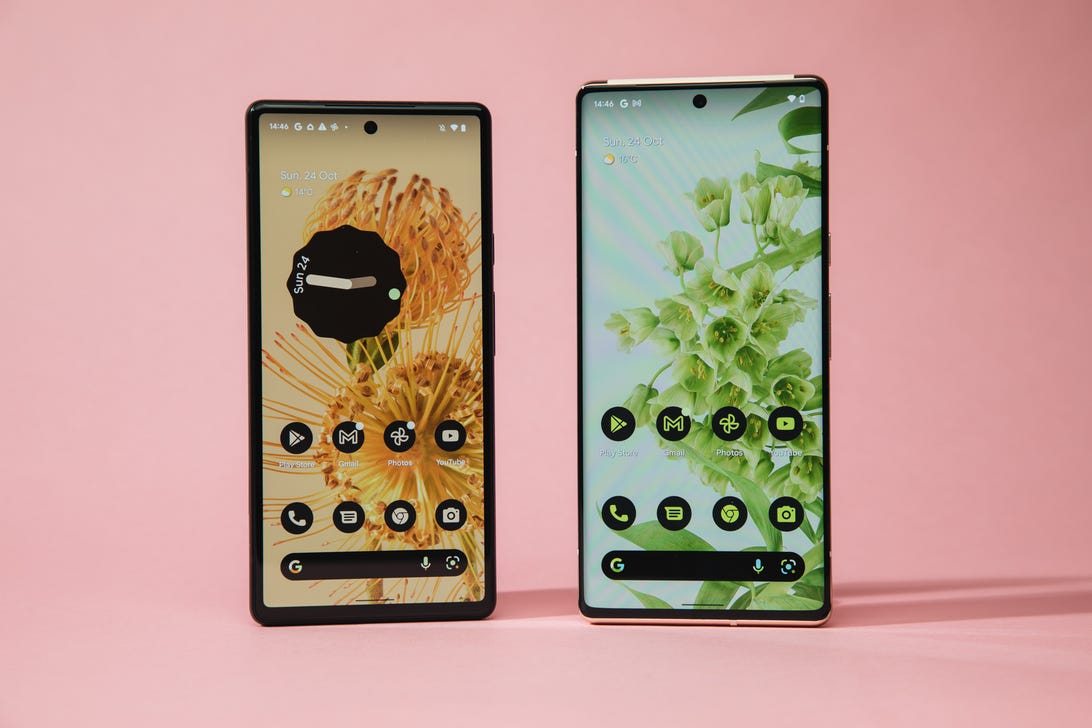
The Pixel 6 and Pixel 6 Pro are two of the currently supported devices that can currently run Android 13 beta.
Andrew Hoyle/CNETWe'll add more devices to this list as they become supported.
How to download Android 13 beta on your supported device
The easiest way to download Android 13 beta on your phone is to go to the Android Beta for Pixel page on your computer, check if your device is supported and then enroll in the Android 13 program.
Under the Your eligible devices option, you should see your phone if it is supported (make sure your phone is charged over 10%, or else it may not appear).
As long as you haven't signed up for the Android 12 beta or Android 13 developer preview, you will see the option to opt in. If you've already signed up for the aforementioned prereleases, you don't need to do anything to get Android 13. You should automatically receive an update on your phone.
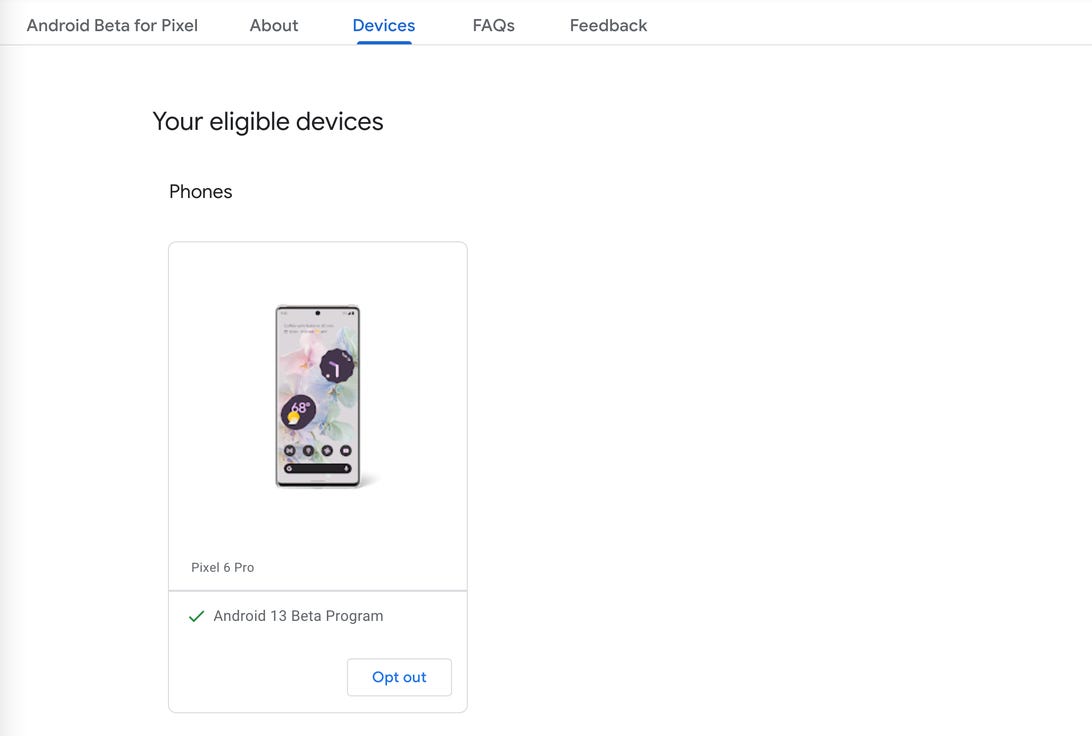
If you device supports Android 13 beta, it will appear under "Your eligible devices."
Nelson Aguilar/CNETTo enroll in the Android 13 beta, click Opt in and then click Confirm and enroll after reading the terms and conditions. You should see a notification that says your device is now part of the Android 13 beta program.
You will then receive an over-the-air update on your phone. If you don't get a notification on your phone, go to Settings > System > System update to view your Android 13 update. It may take up to 24 hours to receive the OTA update.
How long will the Android 13 beta last for?
You should expect updates up until the public release of Android 13, which will likely launch sometime in the fall of this year. According to Google, you should receive two updates a month in May, June and July.
Also, the Android 13 beta program as a whole will continue until June 2023, which means that you'll continuously receive beta updates up until the next beta release, unless you opt out.
How do I opt out of the Android 13 beta?
To opt out of the Android 13 beta program, go back to the Android Beta for Pixel page, but this time click Opt out. Within 24 hours, you should receive an OTA update on your phone that will wipe out all your locally saved data and provide you with whatever the latest public version of Android is at the time. As mentioned before, this is why you need to back up your device before enrolling in the Android 13 beta program.

You must be logged in to post a comment.