

Moving from Magento to Shopify represents a significant change in strategy because Magento has been able to give businesses lots of open-source options; however, the continual demands of having to manage servers, apply security patches, and relying heavily on developers have led many to find other solutions.
In 2026, the shift toward performance-first software-as-a-service platforms has made Shopify the destination of choice for brands wanting to focus on scaling sales rather than managing complex infrastructure.
However, moving a mature store is not as simple as exporting a spreadsheet and uploading it to a new dashboard.
magento to shopify migration requires meticulous planning, a deep understanding of structural data differences, and a bulletproof strategy to protect your hard-earned search rankings. This guide covers the essential best practices for a seamless transition, ensuring your operational efficiency and digital health remain intact.
Why Modern Brands Are Replatforming to Shopify
The modern e-commerce environment demands agility. Businesses suffer from unforeseen costs related to traditional open source software platforms due to their support costs typically consuming between 20% and 40% of their technology budgets just to maintain the platform(s). By utilizing Shopify for an eCommerce platform as opposed to Magento, brands can eliminate the operational support associated with the management of hosting, security compliance and unpredictable development costs.
Also, Shopify has built-in optimizations for quick checkout and mobile optimization. With global eCommerce conversion rates averaging below two percent (2%), small changes in performance directly affect your sales. Transitioning from Magento to a fully managed cloud enabled Shopify solution will free your team from providing "hot fixes" to address software bugs and allow them to focus on conversion rate optimization and expanding internationally.
Pre-Migration Infrastructure and Strategy
A successful replatforming project lives or dies in the preparation phase. Before touching a line of data, you must perform an exhaustive business audit to understand exactly what needs to move and how it will fit into your new ecosystem.
The Ultimate Data Cleanup
Avoid migrating data that has not been cleaned up over multiple years. Over time, a Magento database can have many duplicate customers, dead products, and messy attributes. This migration should give you an opportunity to clean up your catalog by archiving old SKU numbers, standardizing your product names, and removing any unnecessary customer information.
Mapping Complex Database Relationships
Magento and Shopify have very different ways of organizing their data. In terms of data architecture, Magento uses an Entity-Attribute-Value (EAV) model while Shopify is more straightforward with its use of fields, tags and metafields. It is very important to create a mapping document prior to initiating your magento to shopify data migration. Plan how your custom product specifications, color swatches, and tiered pricing logic will be translated into Shopify metafields or metaobjects to prevent broken links on your product pages.
Safeguarding Organic Traffic with an SEO Site Health Check
The single greatest fear during any platform migration is a catastrophic drop in organic traffic. If you change your website platform without protecting your search engine footprint, you risk losing years of authority overnight. A rigorous website seo health check is non-negotiable.
Conducting a Website SEO Health Check
Before launching, perform a comprehensive website health checker audit on your live Magento store. Document every top-performing page, your exact meta titles, descriptions, canonical tags, and existing schema markup. This serves as your benchmark. You must replicate this metadata on the new platform to signal continuity to search engine crawlers.
The Power of 1:1 301 Redirects
URL structure is handled differently by both platforms. For example: custom paths can be set in Magento but Shopify dictates that specific sub-directories should be followed for products, blogs, etc. Since there will be a complete change in URL's from those used in Magento then you will need to create mapping for 1:1 redirection. Export your complete rewrite history from Magento and use this information to create your redirect mapping. It is imperative that all of your old links point to their exact new equivalent.
Executing the Migration Process Seamlessly
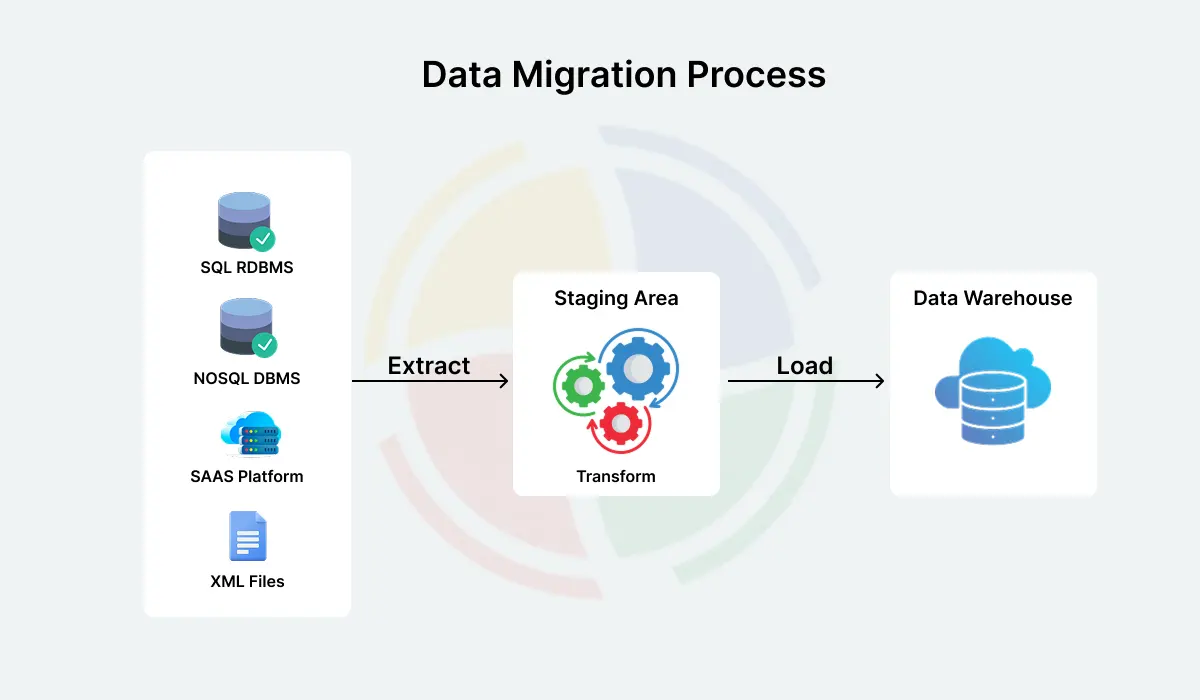
Once your architecture is mapped and your SEO safety nets are in place, you can begin moving the core elements of your enterprise.
Data Sequencing Principles
The order in which you import your data matters deeply. Always follow a logical sequence to maintain database relationships:
- Products and Collections: Build your catalog structure first so that incoming orders and customer profiles have items to link against.
- Customer Records: Import your customer databases, ensuring email addresses and historic records are aligned.
- Order History: Bring over historical sales data. This is critical for customer service continuity and financial reporting.
Handling Theme Rebuilds and Integrations
You will not be able to just take themes or extensions from Magento to Shopify. The entire design will need to be rebuilt using either modern templated systems or flexible online store themes found in Shopify. Perform an audit on each of your existing extensions in Magento and then find their equivalent in the Shopify application ecosystem.Prioritize lightweight, highly rated apps for reviews, email marketing, and shipping automation to keep your script footprint minimal and your loading speeds fast.
Pros, Cons, and Frequently Asked Questions

Understanding the distinct advantages and trade-offs of this move helps align business expectations for the post-launch phase.
The Advantages of Switching
- Lower Total Cost of Ownership: Eliminates expensive hosting fees, emergency developer interventions, and routine security patch costs.
- Elite Checkout Performance: Grants immediate access to high-converting accelerated checkouts and native digital wallet integrations.
- Operational Independence: Marketing and merchandising teams can launch discounts, update landing pages, and adjust catalogs without needing code.
The Operational Challenges
- URLs need to follow Shopify web address format and URL redirects must be managed accurately.
- Any previously purchased themes, apps and custom development code must be updated to current applications and the design of the new site should be contemporary.
- Due to security reasons, we cannot transfer the encrypted passwords of our customers. Therefore they will need to create their account again when they log into the new website for the first time.
Frequently Asked Questions
How long does a typical Magento to Shopify migration take?
Small and medium-sized businesses automate their processes or use applications and typically require 3-to-6 weeks to complete the transition from a manual to an electronic environment. In contrast, large enterprises generally take between 12-to-24 weeks because they have many complicated products (catalogs), a lot of resources invested in custom application development, and must integrate their existing ERP system into the new system.
Will my search engine rankings drop after replatforming?
If you execute a meticulous website seo health check and implement flawless redirects, any ranking fluctuations will be minor and temporary, typically stabilizing within four to eight weeks. Many brands experience a net increase in traffic post-migration due to vastly superior page loading speeds.
How do I handle wholesale or B2B features during the transition?
Modern enterprise e-commerce systems allow you to handle both retail and wholesale architectures from a single administrative panel. You can set up custom corporate accounts, price lists, and payment terms natively without needing separate standalone stores.
Conclusion
Migrating from Magento to Shopify is a powerful move that frees your business from technical debt and sets the stage for rapid growth. By focusing on deep data cleansing, precise attribute mapping, and prioritizing an exhaustive seo site health check, you can safely transition your storefront without sacrificing your hard-earned organic visibility. Treat the project as a structured progression rather than an overnight switch, and your brand will reap the rewards of a faster, more secure, and highly scalable digital storefront.

You must be logged in to post a comment.