
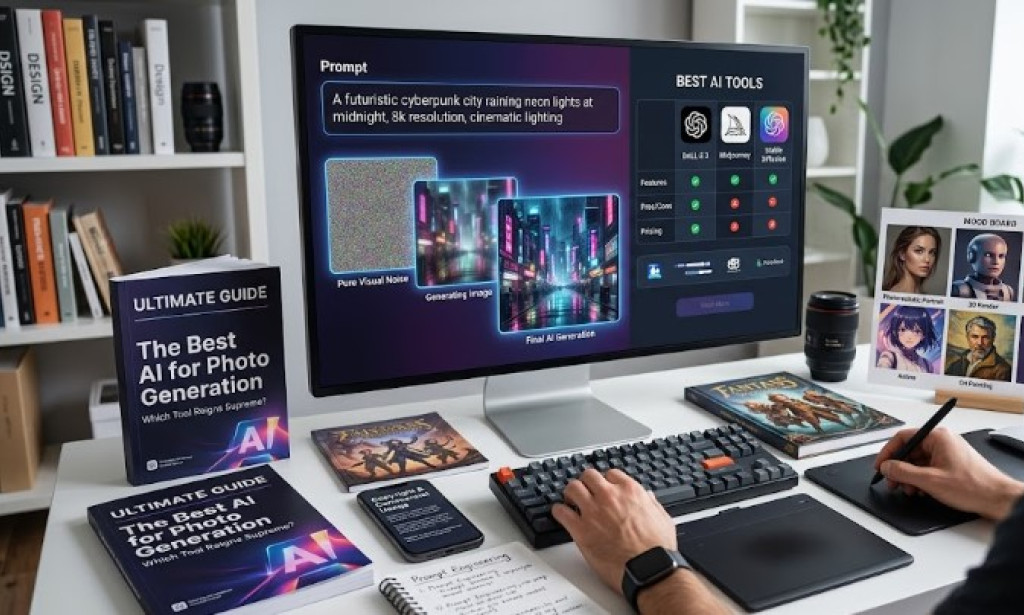
Welcome to the golden age of digital creativity! If you have ever wanted to bring the wild, vivid landscapes of your imagination to life but lacked the drawing or Photoshop skills to do so, you are in the right place. The world of Artificial Intelligence has evolved at a breakneck pace, and text-to-image AI generators are at the forefront of this revolution.
Whether you are a digital marketer looking for the perfect ad creative, an author visualizing book characters, a graphic designer seeking inspiration, or simply a hobbyist wanting to create stunning wallpapers, finding the best AI for photo generation is crucial.
In this comprehensive, 2000+ word guide, we will dive deep into the absolute best AI image generators available today. We will compare their features, pros, cons, pricing, and specific use cases. Furthermore, we will explore the nuances of prompt engineering and answer the most pressing questions regarding copyright and commercial usage.
Let’s turn your words into breathtaking visuals!
What is AI Photo Generation?
Before we jump into the tools, let's briefly understand how this magic works. AI photo generation (or text-to-image generation) utilizes machine learning models—most notably Diffusion Models and Generative Adversarial Networks (GANs)—that have been trained on billions of image-text pairs.
When you type a prompt (a text description) like "A futuristic cyberpunk city raining neon lights at midnight, 8k resolution, cinematic lighting," the AI understands the semantic meaning of those words. It then starts with a canvas of pure visual "noise" (like static on an old TV) and gradually refines and denoises it step-by-step until an image matching your text emerges.
The results are no longer just blurry abstract shapes; today's AI can generate photorealistic portraits, 3D renders, anime art, oil paintings, and vector graphics that rival human artists.
Top 5 Best AI Photo Generators of the Year
There is no single "best" tool for everyone. The right AI generator depends on what you value most: ease of use, photorealism, artistic freedom, or commercial safety. Here are the titans of the industry.
1. Midjourney: The King of Photorealism and Artistic Quality
When it comes to sheer aesthetic brilliance, jaw-dropping photorealism, and artistic flair, Midjourney remains the undisputed heavyweight champion. Originally accessible only via a Discord bot, Midjourney now offers a web interface for its users, making it more accessible than ever.
Midjourney excels at understanding the nuances of lighting, texture, and camera angles. If you ask it for a macro photography shot of a ladybug on a dew-covered leaf, you will get an image that looks like it was shot on a $5,000 DSLR camera.
Key Features:
-
Unmatched Realism: Highly detailed skin textures, lighting, and reflections.
-
Stylistic Range: Can mimic specific art styles, from Renaissance paintings to modern digital art and anime (Niji mode).
-
Upscaling and Panning: Features to zoom out, pan, and upscale images without losing quality.
-
Character Consistency: Advanced parameters to keep characters looking consistent across multiple generated images.
Pros:
-
Produces the most beautiful, "ready-to-use" art out of the box.
-
Excellent community and robust documentation.
-
Incredible attention to artistic detail.
Cons:
-
No longer offers a free tier (paid subscription required).
-
The Discord interface (if you don't have web access yet) can be overwhelming for beginners.
-
Can sometimes take artistic liberties and ignore specific details in complex prompts.
Best For: Artists, conceptual designers, and marketers who need high-end, visually stunning imagery.
2. DALL-E 3 (by OpenAI): The Master of Prompt Adherence
Created by OpenAI (the makers of ChatGPT), DALL-E 3 is a massive leap forward from its predecessors. What makes DALL-E 3 special is its integration directly into ChatGPT. You don't need to learn complex "prompt engineering" jargon. You can simply have a conversation with ChatGPT, and it will write the optimized prompt for you.
DALL-E 3 is unparalleled in its ability to follow instructions exactly. If you ask for a red car parked next to a blue bicycle in front of a bakery with a sign that says "Fresh Bread," DALL-E 3 will likely get every single element and the text right on the first try.
Key Features:
-
Conversational Interface: Integrated into ChatGPT Plus.
-
Exceptional Prompt Adherence: Understands complex instructions, spatial relationships, and specific details.
-
Text Generation: Actually capable of generating legible text within images (e.g., signs, logos, t-shirts).
-
Safety Guardrails: Strict safety measures to prevent the generation of harmful, violent, or non-consensual content.
Pros:
-
Incredibly easy to use for beginners.
-
Generates accurate text on images.
-
Perfectly follows complex, multi-subject prompts.
Cons:
-
Requires a ChatGPT Plus subscription (though accessible for free via Microsoft Copilot/Bing Image Creator).
-
Images can sometimes look slightly more "artificial" or "plasticky" compared to Midjourney's raw realism.
-
Fewer customization controls (like aspect ratio adjustments are somewhat limited compared to others).
Best For: Marketers needing text in images, storytellers, and beginners who want exactly what they ask for without tweaking prompts.
3. Stable Diffusion (by Stability AI): The Open-Source Powerhouse
If you are a tinkerer, a developer, or someone who demands absolute, pixel-perfect control over your generations, Stable Diffusion is the best AI for photo generation for you. Unlike Midjourney or DALL-E, Stable Diffusion is open-source.
This means you can run it locally on your own computer (provided you have a powerful enough GPU), totally free of charge, with no censorship or subscription fees. Through user interfaces like Automatic1111 or ComfyUI, you can use advanced tools like ControlNet to dictate the exact pose of a character, the structure of a room, or the lighting map.
Key Features:
-
Open-Source & Free: Can be run locally for free.
-
ControlNet Integration: Allows you to use reference images to copy poses, depth, or outlines exactly.
-
Custom Models (LoRAs): You can train the AI on your own face, your specific products, or a highly specific art style.
-
Inpainting & Outpainting: Advanced tools for modifying specific parts of an image or extending the borders of an image seamlessly.
Pros:
-
Completely free if run locally.
-
Absolute control over every aspect of the generation process.
-
Massive community creating custom models on sites like Civitai.
Cons:
-
Extremely steep learning curve. The interface can look like an airplane dashboard.
-
Requires a powerful, expensive computer (high-end GPU) to run locally at good speeds.
-
Requires a lot of trial and error to get perfect results.
Best For: Advanced users, game developers, AI artists, and businesses wanting to train models on their own products.
4. Adobe Firefly: The Commercially Safe Option
One of the biggest concerns for businesses using AI is copyright infringement. What if the AI generates an image that looks too similar to a copyrighted piece of art? Enter Adobe Firefly.
Adobe built Firefly differently from the ground up. It was trained exclusively on Adobe Stock images, openly licensed content, and public domain content where copyright has expired. This means Firefly is designed to be commercially safe. Furthermore, it is deeply integrated into Adobe's flagship products like Photoshop (Generative Fill) and Illustrator.
Key Features:
-
Commercial Safety: Trained on licensed content, protecting users from copyright claims.
-
Generative Fill: Seamlessly integrated into Photoshop to add, remove, or modify elements within existing photos.
-
Text Effects: Can generate stylized text and fonts.
-
Vector Recolor: Useful for graphic designers working in Illustrator.
Pros:
-
Peace of mind for commercial and enterprise use.
-
Incredible integration into existing graphic design workflows (Photoshop).
-
Very intuitive, user-friendly web interface.
Cons:
-
The raw photorealism and artistic creativity sometimes lag slightly behind Midjourney.
-
Strict safety filters can sometimes be overly aggressive, blocking benign prompts.
Best For: Graphic designers, agencies, and enterprise businesses who need copyright safety and use Adobe Creative Cloud.
5. Leonardo.ai: The Best All-in-One Platform
Leonardo.ai has rapidly risen through the ranks to become one of the most popular AI image generators. It essentially takes the power of Stable Diffusion and wraps it in a gorgeous, user-friendly web interface. You don't need a powerful computer to use it.
Leonardo is particularly popular among game developers and concept artists. It offers a suite of finely-tuned models tailored for specific tasks: photorealism, 3D animation, pixel art, and more. It also features incredible tools like Realtime Canvas (where you sketch, and the AI renders it instantly) and Motion (to animate your generated images).
Key Features:
-
Variety of Models: Switch between dozens of fine-tuned models depending on the style you need.
-
Realtime Generation: Sketching tools that generate AI art as you draw.
-
Image to Image: Upload an image and use it as a base for the AI to alter.
-
Generous Free Tier: Offers a daily allowance of free tokens.
Pros:
-
Excellent user interface that balances ease of use with advanced controls.
-
Great free tier for casual users.
-
Incredible suite of features (upscaling, motion, canvas editing).
Cons:
-
Token system can be confusing; different actions cost different amounts of tokens.
-
Can be overwhelming with the sheer number of options and models available.
Best For: Game developers, indie artists, and budget-conscious creators who want advanced features without needing a high-end PC.
How to Choose the Right AI Image Generator for You
Still not sure which one to pick? Ask yourself these questions:
-
Are you a business worried about copyright? Choose Adobe Firefly. It is the safest bet for commercial use without fear of legal repercussions.
-
Do you want the most beautiful, realistic images possible? Choose Midjourney. It requires a subscription, but the visual quality is unmatched.
-
Do you need the AI to follow long, complex instructions perfectly? Choose DALL-E 3. It is the smartest at understanding exactly what you want.
-
Are you a tech-savvy user wanting total control for free? Choose Stable Diffusion. Get ready to learn about nodes, ControlNet, and custom models.
-
Do you want a great UI with a generous daily free tier? Choose Leonardo.ai. It offers the best balance of power and accessibility.
The Art of Prompt Engineering: Pro Tips for Better Images
Even the best AI for photo generation will output mediocre results if your prompt is poor. Prompt engineering is the skill of talking to the AI. Here is how to construct the perfect prompt:
1. The Structure of a Great Prompt
Don't just type "a dog." Be specific. Use this formula: [Subject] + [Environment/Setting] + [Action/Pose] + [Style/Medium] + [Lighting] + [Camera Details]
-
Bad Prompt: "A photo of a dog in space."
-
Good Prompt: "A golden retriever wearing a highly detailed futuristic spacesuit, floating inside an illuminated space station, cinematic lighting, 8k resolution, shot on 35mm lens, photorealistic, Unreal Engine 5 render."
2. Specify the Medium
Tell the AI what kind of art you want. Use keywords like:
-
Photography styles: Polaroid, DSLR, macro photography, drone shot, vintage photo.
-
Art styles: Oil painting, watercolor, cyberpunk, steampunk, anime, studio Ghibli style, pencil sketch, 3D render.
3. Control the Lighting and Colors
Lighting makes or breaks an image. Use terms like:
-
Golden hour, moody lighting, neon lights, cinematic lighting, volumetric lighting (god rays), pastel colors, high contrast.
4. Use Negative Prompts (Where Applicable)
Tools like Stable Diffusion and Leonardo allow "negative prompts" (what you don't want to see). Common negative prompts include:
-
Negative prompt: "Ugly, mutated hands, blurry, low resolution, watermark, text, signature."
Navigating Copyright and Commercial Use (The "Copyright Free" Dilemma)
One of the most frequently asked questions is: "Are AI-generated images copyright free?"
The legal landscape is still evolving, but here is the current consensus as of 2026:
1. You Cannot Copyright AI Art (Usually): In most jurisdictions, including the US Copyright Office, works created entirely by a machine without human creative input cannot be copyrighted. This means if you generate an image, you do not "own" the exclusive copyright to it. Someone else could technically download and use your generated image. (However, if you heavily edit the AI image in Photoshop, the edits may be copyrightable).
2. Can You Use Them Commercially? Yes, generally. Most major platforms (Midjourney, DALL-E 3, Leonardo) grant you full commercial rights to the images you generate using their paid tiers. You can use them on your blog, print them on t-shirts, or use them in ads.
3. The Training Data Issue: The controversy lies in how the AI was trained. Many AI models were trained on copyrighted images scraped from the web without artists' permission. If you generate an image that looks exactly like Mickey Mouse or a specific living artist's work, using it commercially could get you sued for trademark or copyright infringement by the original creator.
The Safest Route: If you are a large corporation or using the images for high-stakes commercial campaigns, Adobe Firefly is the only tool that guarantees safety, as Adobe promises to indemnify enterprise users against copyright claims. For standard bloggers and small businesses, using Midjourney or DALL-E is generally considered safe, provided you do not prompt the AI to recreate trademarked logos, characters, or specific artists' styles.
The Future of AI Photo Generation
What does the future hold? We are already seeing the lines blur between image and video generation (with tools like Sora and Runway). Soon, we can expect:
-
Flawless Text: The struggle of AI spelling words wrong will completely disappear.
-
Perfect Consistency: Creating a graphic novel with the exact same character across 100 pages will become a one-click process.
-
Real-time Generation in Gaming: Video games that generate textures, environments, and NPC faces in real-time based on player choices.
Conclusion
Finding the best AI for photo generation ultimately comes down to your specific needs, budget, and technical expertise.
-
For breathtaking, award-winning art, go with Midjourney.
-
For ease of use and strict adherence to your text, choose DALL-E 3.
-
For ultimate control and zero cost, learn Stable Diffusion.
-
For commercial safety and design integration, use Adobe Firefly.
-
For a feature-rich, accessible web platform, try Leonardo.ai.
The technology is no longer just a gimmick; it is a fundamental shift in how we create visual content. The best time to start learning how to use these tools was yesterday. The second best time is today. So pick an AI generator, type in your wildest imagination, and watch the magic unfold!
Frequently Asked Questions (FAQs)
Q1: What is the best totally free AI image generator? If you have a powerful PC, Stable Diffusion is the best completely free tool. If you want a web-based tool, Microsoft Copilot (powered by DALL-E 3) is entirely free to use. Leonardo.ai also offers a very generous daily allowance of free tokens.
Q2: Can I sell AI-generated images on stock photo websites? It depends on the platform. Adobe Stock officially accepts AI-generated content (provided it is labeled as such and meets quality standards). Other platforms like Getty Images have banned AI-generated content due to copyright concerns. Always check the specific terms of service of the agency.
Q3: Why does AI mess up hands and faces? While newer models (like Midjourney v6 and DALL-E 3) have mostly solved this issue, older AI models struggle with complex, highly articulated geometry like fingers. The AI doesn't understand the anatomy of a hand; it only recognizes patterns of pixels. When multiple patterns overlap, it gets confused, resulting in extra fingers.
Q4: Do I need to know how to code to use these tools? Not at all! Tools like DALL-E 3, Midjourney, Adobe Firefly, and Leonardo are entirely text-based. You simply type what you want in plain English. Only running Stable Diffusion locally requires a bit of technical setup, but even that has become much easier with one-click installers.
Q5: Will AI replace human graphic designers and artists? AI is a tool, not a replacement. Just as digital cameras didn't replace painters, AI won't replace human creativity. It will likely automate tedious tasks and serve as an incredibly powerful brainstorming tool. Designers who learn to use AI will simply work faster and more efficiently than those who do not.

You must be logged in to post a comment.