

How to Create a Lightning-Fast WordPress Site?
Do you own a WordPress-powered website? Would you like it to be a little quicker?
The performance of your website has a significant impact on your search rankings and bottom line.
You'll learn why performance matters and how to create a lightning-fast WordPress site in this post.

what is Statistics on WordPress?
The most popular content management system is WordPress.
WordPress declared in 2019 that they power one-third of the internet. Out of a sample size of over 64 million websites, BuiltWith found that WordPress is presently used by 43% of them.
Thanks to HTTP Archive, we can compare WordPress websites to Joomla and Magento websites in terms of performance. According to their State of the Web report, the following is a study of websites that run on each platform.
Between July 2019 and July 2021, about 2 million WordPress websites, 52,000 Magento websites, and 133,000 Drupal websites were sampled. The following is what they discovered.
There was a median overall page weight for WordPress websites.
- On desktop browsers, WordPress websites had a median total page weight of 2437.7 KB and 2275.6 KB on mobile browsers.
- On desktop browsers, Magento websites had a median total page weight of 3178.8 KB and 3039.5 KB on mobile browsers.
- On desktop browsers, Drupal websites had a median overall page weight of 2192.1 KB and 2061.6 KB on mobile browsers.
- A webpage's entire size should be less than 500 KB, according to Google. WordPress websites are in the center of the pack in page weight, but they are still significantly beyond Google's recommended maximum page size.
- WordPress websites received an average of 85 queries on desktop browsers, while mobile browsers received an average of 81 requests.
How to Speed Up a WordPress Website?

1. Choose Hyperfast Hosting
“Having a website hosted on a slow server makes your users dissatisfied and can make crawling more difficult,” he continues.
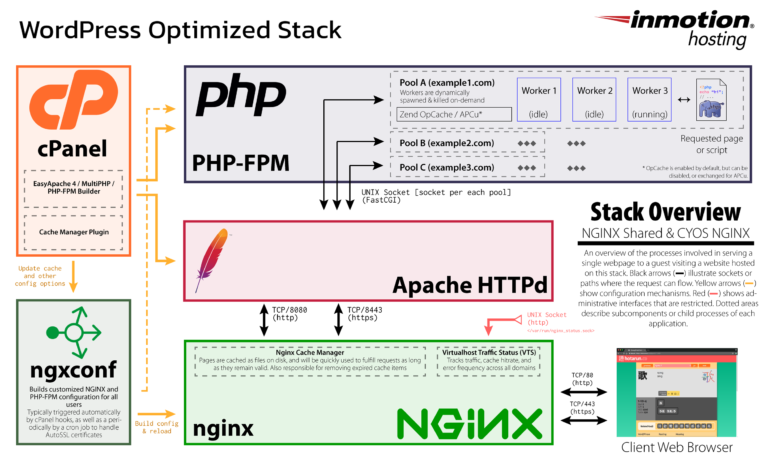
InMotion Hosting invented UltraStack for WordPress websites since the performance of your website is determined by its server. UltraStack is a proprietary technological stack with enhanced caching that is fine-tuned for speed.
The WordPress UltraStack is made up of the following components.
Using PHP to cache material, NGINX increases the performance of any PHP/HTML/CSS website, including WordPress. This eliminates the need to load source code for each new visitor. The Cache Manager Plugin allows you to control caching.
With pools of memory and processing per user and variable max request and timeout settings, the PHP-FastCGI Process Manager (PHP-FPM) is more secure and efficient than SuPHP at enhancing website speed.
Brotli Compression uses quicker compression rates and fewer server resources to increase your website's time to the first byte.
Aside from the UltraStack, the WordPress VPS includes SSDs (20x quicker than spinning discs), a dedicated IP address, and other features. To ensure that your website outperforms your competitors, use a content delivery network. This high-performance infrastructure is built for data workloads that require a lot of I/O and demanding apps and high-traffic websites.
2. Use Caching Plugins?
A caching plugin can help any self-hosted WordPress website. Instead of loading all of the homepage contents each time, they will produce a snapshot of your website that visitors can access on the server. This will result in faster page loading times and overall performance.
1.W3 Total Cache (W3TC) improves your site's SEO and user experience by enhancing website performance and lowering load times. It boasts a 4.5 out of 5-star rating from over 4,500 users, thanks to features like content delivery network (CDN) integration and the newest best practices.
2. WP Super Cache: This Automattic plugin converts your dynamic WordPress blog into static HTML files. Instead of executing the comparably bigger and more expensive WordPress PHP scripts, your web server will serve an HTML file after it has been prepared. More than 1,100 customers have given it a 4.5 out of 5-star rating.
3. WP Fastest Cache: The free version is sufficient for speeding up your site; but, the premium version includes additional capabilities such as Mobile Cache, Widget Cache, Minify HTML Plus, Minify CSS Plus, Minify JS, Combine JS Plus, and more for faster loading times. More than 3,300 individuals have given it a 5 out of 5-star rating.
4. Simple Cache: After becoming irritated with the major caching plugins available and constructing sites with developer-only sophisticated caching solutions that receive millions of visitors each day, Simple Cache was created. More than 50 customers have given it a 4.5 out of 5-star rating.

3. Optimize Your Images
photos, screenshots, or other graphics on your website?
While they play an important role in your product and content marketing, they can also affect your loading speed if not optimized properly.
How large can an image file be?
- An unoptimized screenshot at a resolution of 1,213 × 1,642 pixels created on an iPhone in PNG format comes in at 3.1MB (3,100KB).
- An unoptimized photo at a resolution of 4,337 × 2,891 pixels in JPG format comes in at 18.6MB (18,600KB).
There are several ways you can reduce the size of your images.

THE ENDING CONCLUSION
You must optimize your WordPress website for speed and efficiency to satisfy your website visitors and search engines.


You must be logged in to post a comment.