
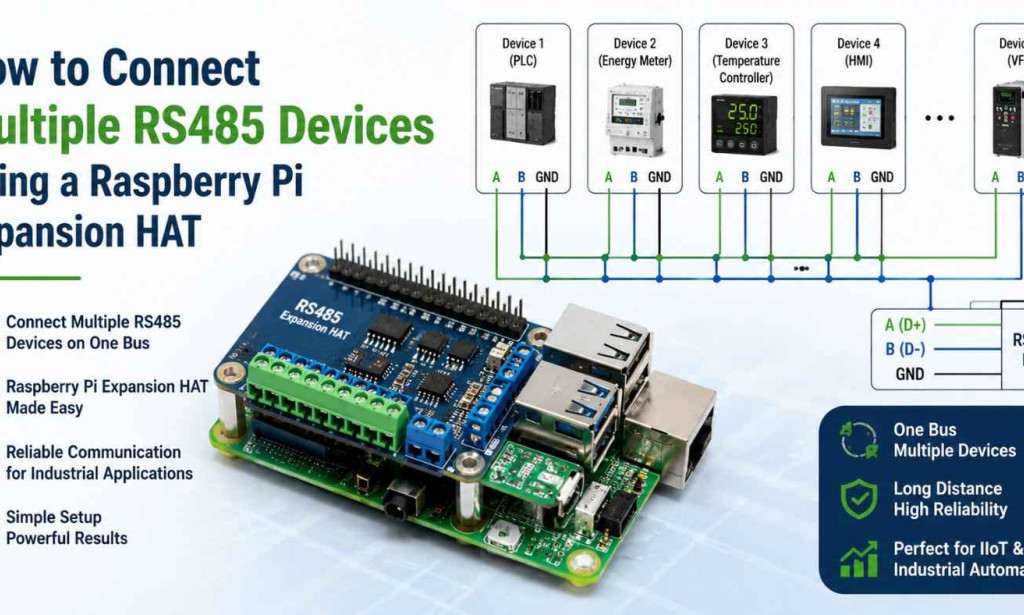
As industries continue to embrace Industry 4.0, Industrial Internet of Things (IIoT), and smart automation, reliable communication between multiple devices has become more important than ever. Many industrial systems rely on the RS485 communication protocol because of its exceptional reliability, long-distance capabilities, and resistance to electrical noise.
The Raspberry Pi has become a popular platform for industrial automation, data acquisition, edge computing, and IoT gateway development. However, since the Raspberry Pi does not include native RS485 communication, developers often use a Raspberry Pi RS485 Expansion HAT to connect PLCs, sensors, energy meters, Human Machine Interfaces (HMIs), variable frequency drives (VFDs), and other industrial devices.
One of the greatest advantages of RS485 is its ability to support multiple devices on a single communication bus, making it ideal for industrial environments where numerous devices need to exchange data efficiently.
Understanding RS485 Communication
RS485 is a differential serial communication standard widely used in industrial automation and control systems.
Unlike RS232, which supports only point-to-point communication, RS485 enables multi-drop communication, allowing many devices to share the same communication line.
Key Features of RS485
-
Long-distance communication (up to approximately 1,200 meters)
-
High noise immunity
-
Multi-device networking
-
Reliable data transmission
-
Low installation cost
-
Suitable for industrial environments
-
Supports half-duplex and full-duplex communication
These characteristics make RS485 one of the most trusted communication standards in factories, buildings, transportation systems, and energy infrastructure.
What Is a Raspberry Pi RS485 Expansion HAT?
An RS485 Expansion HAT is an add-on board that connects to the Raspberry Pi's GPIO header, enabling communication with RS485-compatible devices.
Most industrial-grade HATs include:
-
RS485 transceiver
-
Electrical isolation
-
Surge protection
-
Terminal block connectors
-
Status LEDs
-
Automatic transmit/receive switching
-
Industrial-grade components
Some advanced HATs provide:
-
Dual RS485 channels
-
Multiple serial ports
-
Modbus RTU support
-
High-speed communication
-
Wide operating temperature range
Why Use an RS485 Expansion HAT?
Using an expansion HAT offers several advantages over basic USB-to-RS485 adapters.
Benefits
-
Stable industrial communication
-
Better electrical isolation
-
Reliable long-term operation
-
Lower communication latency
-
Direct GPIO integration
-
Improved durability
-
Enhanced protection against voltage spikes
-
Easy installation
For industrial environments, an isolated RS485 HAT provides better reliability and protection against electrical interference.
Components Required
Before starting, gather the following components:
-
Raspberry Pi 5 (4GB RAM or higher recommended)
-
RS485 Expansion HAT
-
MicroSD card with Raspberry Pi OS
-
Stable power supply
-
RS485-compatible devices
-
Twisted-pair RS485 cable
-
Ethernet or Wi-Fi connection (optional)
-
Terminal screwdriver
-
USB keyboard and monitor (for initial setup)
Common RS485 Devices You Can Connect
A Raspberry Pi with an RS485 Expansion HAT can communicate with various industrial devices, including:
-
Programmable Logic Controllers (PLCs)
-
Human Machine Interfaces (HMIs)
-
Energy meters
-
Temperature controllers
-
Motor drives
-
Variable Frequency Drives (VFDs)
-
Barcode scanners
-
Industrial sensors
-
Weighing scales
-
Smart electricity meters
-
Building management systems
-
Data loggers
Understanding the RS485 Bus Topology
RS485 uses a bus topology, where all devices are connected along the same communication line.
A typical setup looks like this:
Raspberry Pi
│
RS485 Expansion HAT
│
------------------------------
│ │ │ │ │
PLC Meter Sensor HMI VFD
Each device connects to the same pair of communication wires, allowing efficient data exchange.
Step 1: Install the Expansion HAT
Power off the Raspberry Pi before installation.
Then:
-
Align the GPIO pins.
-
Carefully press the HAT onto the Raspberry Pi.
-
Secure the board using mounting spacers.
-
Verify that all pins are properly seated.
-
Power on the Raspberry Pi.
Step 2: Identify RS485 Terminals
Most RS485 HATs include the following terminals:
|
Terminal |
Function |
|
A (D+) |
Positive Data Line |
|
B (D-) |
Negative Data Line |
|
GND |
Ground (optional depending on installation) |
Some manufacturers may label terminals differently, so always refer to the product documentation.
Step 3: Wire Multiple Devices
Connect every device in parallel.
Example:
Pi HAT A -------- Device A+
Device B+
Device C+
Pi HAT B -------- Device A-
Device B-
Device C-
Avoid star wiring, as it can cause signal reflections and communication errors.
Step 4: Assign Unique Device Addresses
When using protocols such as Modbus RTU, every device must have a unique slave address.
Example:
|
Device |
Address |
|
PLC |
1 |
|
Energy Meter |
2 |
|
Temperature Controller |
3 |
|
HMI |
4 |
|
Motor Drive |
5 |
Duplicate addresses will lead to communication conflicts.
Step 5: Configure Communication Parameters
All devices must use identical communication settings.
Typical parameters include:
-
Baud Rate: 9600, 19200, 38400, or 115200
-
Data Bits: 8
-
Stop Bits: 1
-
Parity: None, Even, or Odd
For example:
Baud Rate: 9600
Data Bits: 8
Parity: None
Stop Bits: 1
Consistency across devices is essential for reliable communication.
Step 6: Enable the Serial Interface on Raspberry Pi
Configure the Raspberry Pi to use its UART interface by:
-
Opening the Raspberry Pi configuration utility.
-
Enabling the serial hardware.
-
Disabling the serial login console if necessary.
-
Rebooting the system.
This ensures the UART is available for RS485 communication.
Step 7: Install Communication Libraries
Python is widely used for industrial communication on the Raspberry Pi.
Common libraries include:
-
pySerial for serial communication
-
minimalmodbus for Modbus RTU
-
pymodbus for advanced Modbus applications
These libraries simplify communication with RS485 devices.
Step 8: Test Communication
Before deploying your application:
-
Verify each device responds individually.
-
Read registers or sensor values.
-
Check response times.
-
Monitor for communication errors.
-
Confirm correct addressing.
Testing devices one by one helps isolate issues early.
Using Modbus RTU Over RS485
Modbus RTU is one of the most widely used protocols over RS485.
Its advantages include:
-
Standardized communication
-
Multi-device support
-
Simple implementation
-
Broad compatibility
-
Reliable industrial performance
Typical workflow:
-
Raspberry Pi acts as the Modbus master.
-
Devices act as Modbus slaves.
-
The Pi polls each slave sequentially.
-
Responses are processed and logged.
This architecture supports scalable industrial networks.
Best Practices for Connecting Multiple RS485 Devices
Use Twisted-Pair Cable
Twisted-pair cables reduce electromagnetic interference and improve signal integrity, especially over long distances.
Install Termination Resistors
Use 120-ohm termination resistors at both ends of the RS485 bus to minimize signal reflections.
Keep Cable Length Within Limits
RS485 supports long cable runs, but exceeding recommended lengths or using poor-quality cable can degrade performance.
Avoid Star Topology
Daisy-chain (bus) wiring is preferred. Star connections increase the likelihood of reflections and communication errors.
Maintain Proper Grounding
Where required, ensure proper grounding to reduce electrical noise and protect equipment from voltage differences.
Use Electrical Isolation
Industrial environments often experience voltage spikes and ground loops. An isolated RS485 HAT protects the Raspberry Pi and connected devices from these issues.
Label Devices Clearly
Mark each device with its address and communication settings to simplify maintenance and troubleshooting.
Troubleshooting Common Issues
No Communication
Possible causes:
-
Incorrect wiring
-
Loose connections
-
Wrong baud rate
-
Incorrect device address
-
Faulty cable
Communication Timeouts
Possible causes:
-
Excessive cable length
-
Electrical interference
-
Missing termination resistors
-
Incorrect parity settings
Intermittent Data Errors
Possible causes:
-
Poor cable quality
-
Voltage fluctuations
-
Ground loops
-
Damaged connectors
Duplicate Device Addresses
If two devices share the same Modbus address, communication will fail. Ensure each slave address is unique.
Real-World Applications
Industrial Automation
A Raspberry Pi can collect data from:
-
PLCs
-
HMIs
-
Motor drives
-
Conveyor systems
-
Production equipment
This enables centralized monitoring and control.
Smart Energy Monitoring
Monitor multiple:
-
Power meters
-
Solar inverters
-
Battery systems
-
Energy analyzers
The Raspberry Pi can aggregate and visualize energy data.
Building Management Systems
RS485 connects HVAC controllers, lighting systems, and environmental sensors, allowing centralized building automation.
Agriculture
In smart farming, a Raspberry Pi can communicate with:
-
Soil moisture sensors
-
Irrigation controllers
-
Weather stations
-
Nutrient monitoring devices
This supports precision agriculture and resource optimization.
Smart Water Management
Water treatment facilities use RS485 to monitor:
-
Flow meters
-
Pressure sensors
-
Pump controllers
-
Water quality analyzers
The Raspberry Pi acts as an efficient edge gateway.
Future Trends
As industrial automation evolves, RS485 networks are becoming more intelligent through integration with modern technologies:
-
Edge Computing: Local processing reduces latency and bandwidth usage.
-
Industrial IoT (IIoT): RS485 devices connect to cloud platforms through Raspberry Pi gateways.
-
AI-Based Predictive Maintenance: Data from multiple devices is analyzed to detect failures before they occur.
-
Cloud Integration: Real-time dashboards enable remote monitoring and management.
-
Cybersecurity Enhancements: Secure communication and authentication protect industrial networks from unauthorized access.
These trends ensure that RS485 remains a valuable communication standard alongside newer industrial networking technologies.
Conclusion
Connecting multiple RS485 devices using a Raspberry Pi Expansion HAT is an effective and scalable solution for industrial automation, IoT, building management, energy monitoring, and smart infrastructure projects. By leveraging RS485's multi-drop communication capabilities, developers can integrate numerous devices onto a single bus while maintaining reliable long-distance communication and strong resistance to electrical noise.
Successful implementation depends on following best practices such as using proper bus topology, assigning unique device addresses, matching communication parameters, installing termination resistors, and selecting an isolated RS485 Expansion HAT for added protection in demanding environments.
Whether you're building an industrial gateway, monitoring energy consumption, automating factory equipment, or deploying an edge computing solution, combining a Raspberry Pi 5 with a high-quality RS485 Expansion HAT provides a cost-effective, flexible, and future-ready platform capable of supporting the growing demands of modern industrial communication.

You must be logged in to post a comment.