
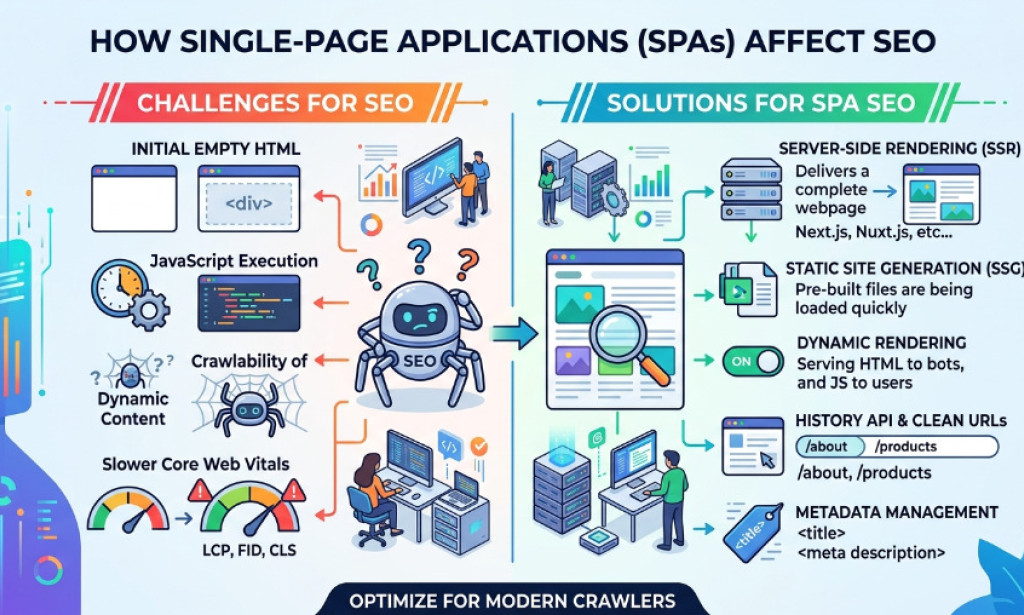
I've been burned by this exact problem before. A client came to me with a beautifully built React app - smooth transitions, lightning-fast UI, the whole package. We checked Google Search Console. Barely indexed. Barely ranking. Six months of development, and Google was treating the site like it barely existed.
Single-page applications are everywhere now. But the SEO challenges they bring? Most developers either don't know about them or wave them away as "already solved." Spoiler: they're not always solved. And if you're building or managing an SPA without a clear SEO strategy, you're likely leaving traffic - and revenue - on the table.
What makes single-page applications different for Google
A traditional website loads a new HTML page every time a user clicks a link. Google's crawler visits each URL, reads the HTML, and indexes the content. Simple.
An SPA works differently. The browser loads one HTML file usually nearly empty and then JavaScript builds the entire page dynamically. When you click a link, the URL might change, but the browser doesn't actually request a new page from the server. JavaScript just swaps out the content on-screen.
For users, this feels seamless. For Google, it creates a real problem, especially when it comes to SEO for single page applications.
Key Issue
Googlebot has to render JavaScript before it can read your content. That rendering happens in a second wave often delayed by hours or even days. During that gap, your content is essentially invisible to the index.
Google has gotten much better at JavaScript rendering since 2020, but "better" doesn't mean "perfect." Crawl budget, rendering queues, and JavaScript errors still cause real indexing failures all the time, which is why SEO for single page applications still requires careful technical optimization.
The core SEO risks single-page applications create
Thin or missing HTML at crawl time
If you open your SPA's page source (not the browser inspector - the actual source), what do you see? If it's mostly <div id="root"></div> and script tags, that's your problem. Google may crawl before JavaScript executes and see nothing meaningful.
URL and routing issues
SPAs often use hash-based routing (/#/about) or client-side routing that doesn't match server-side reality. Google has historically struggled with hash URLs. If your pages don't have canonical, crawlable URLs returning proper HTTP 200 responses, they're at risk.
Duplicate content from poor canonical handling
Without server-side awareness of routes, your SPA might serve identical HTML regardless of which URL is visited. That means Google could see every page as identical content - a significant duplicate content signal that suppresses rankings across the board.
Slow initial load killing Core Web Vitals
SPAs often ship large JavaScript bundles. Even if Google renders them eventually, real users wait for that JS to parse and execute before they see anything. Largest Contentful Paint (LCP) suffers. Time to Interactive (TTI) suffers. Both are ranking signals Google actively weighs in 2026.
The three main solutions - and when to use each
| Solution | SEO impact | Complexity | Best for |
|---|---|---|---|
| Server-Side Rendering (SSR) | Excellent | Medium | E-commerce, blogs |
| Static Site Generation (SSG) | Excellent | Low | Marketing, docs |
| Dynamic Rendering | Acceptable | High | Legacy SPAs (temp fix) |
| Client-Side Only (SPA) | Risky | Low | Behind login only |
Server-Side Rendering (SSR)
SSR means your server renders the full HTML before sending it to the browser. Frameworks like Next.js (React) and Nuxt.js (Vue) do this out of the box. When Google visits an SSR page, it sees complete HTML immediately - no JavaScript rendering required. For content-heavy sites, e-commerce, or anything where SEO is critical, SSR is usually the right call.
Static Site Generation (SSG)
SSG pre-renders every page at build time and serves plain HTML files from a CDN. This is perfect for content that doesn't change per-user: blogs, documentation, marketing pages. Tools like Next.js, Gatsby, and Astro support this approach well.
If your SPA content is relatively static, SSG is often the simplest and most SEO-friendly option. Google loves it - pages are fast, fully crawlable, and Core Web Vitals scores tend to be excellent.
Dynamic Rendering
Dynamic rendering detects whether the visitor is a bot or a real user, then serves pre-rendered HTML to bots and the full JavaScript SPA to humans. Google permits this specifically for JavaScript-heavy sites that can't fully SSR. I'd only recommend this as a temporary fix while you work toward full SSR or SSG.
Practical fixes that actually move the needle
-
Server-render your meta tags first
Even if you can't SSR your full page content, at minimum make sure title tags, meta descriptions, and canonical tags are in the HTML response before JavaScript loads. Libraries like React Helmet help - but they don't solve the crawl-time problem without SSR underneath.
-
Use proper canonical tags on every route
Every URL in your SPA needs a unique, self-referencing canonical tag that matches the URL Google should index. Don't let this fall through the cracks when routes are dynamically generated.
-
Implement structured data server-side
Schema markup in a JavaScript-rendered SPA is frequently missed by crawlers or delayed in indexing. Put it in your server response directly. This is especially important for product pages, articles, and local business pages.
-
Audit regularly with Google's URL Inspection Tool
Don't assume Google is seeing what you see in the browser. Use Search Console's URL Inspection to test the rendered HTML. Gaps between what you see and what Google sees are where rankings die quietly.
-
Split your JavaScript bundles aggressively
Large bundles wreck LCP scores. Use code splitting so users only download the JavaScript they need for the current page. This one change has meaningfully improved Core Web Vitals on several projects I've worked on.
-
Crawl with Screaming Frog in JS rendering mode
Crawl your SPA as a bot would. You'll often catch missing content, broken internal links, and thin pages that look fine in the browser but are invisible to crawlers.
What Google actually says about single-page applications
Google has been consistent: they recommend server-side rendering for SEO-critical content. Their documentation acknowledges the rendering delay and notes that JavaScript rendering consumes crawl budget. John Mueller has said multiple times in public Q&As that SSR is the safer choice for SEO.
That said, Google has improved JavaScript rendering substantially. Simple SPAs with clean routing, good Core Web Vitals, and proper meta tag handling do rank well. The problem tends to be at scale - large sites with hundreds or thousands of routes where rendering delays cause partial indexing.
When a single-page application is actually fine for SEO
Not every SPA needs a full SSR overhaul. You're likely safe when:
- Your SPA has fewer than 50–100 pages that need to rank
- The content isn't time-sensitive (delays don't hurt you)
- Your JavaScript bundle is lean and loads fast on mobile devices
- You've verified Google renders your pages in Search Console
- Core Web Vitals scores are green in your CrUX report
- Pages are behind a login wall and don't need indexing
Apps that live behind login walls, internal dashboards, tools that require authentication - these don't need SEO treatment at all. Pour your energy into the public-facing pages that actually need to rank.
The bottom line
Single-page applications aren't bad for SEO - they're bad for SEO when built without thinking about how search engines experience them. The technology is neutral. The implementation is everything. Start with a crawl audit. See what Google actually renders versus what your browser shows. That gap tells you exactly where to focus first.

You must be logged in to post a comment.