

Hello friends...
how to use “OFFSET” Function using with “ROW” function in @MSExcel
Purpose:
To copy values/ generate required field data from daily routine (big data) files…
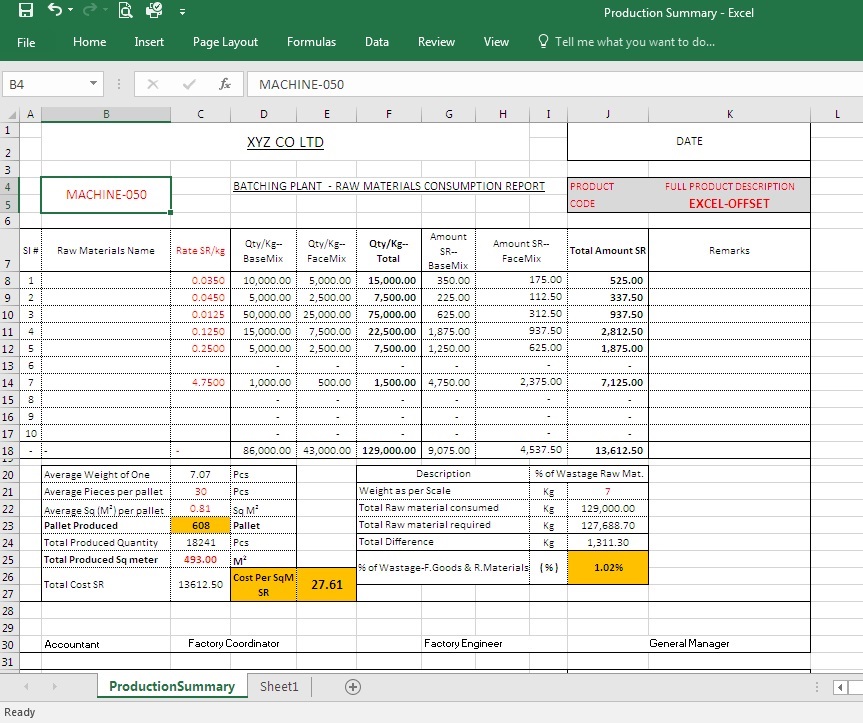
As above picture you can see this is daily basis production report, which continues in same range of data like it’s started from A1 to L30 for 1-page report, for second page it continues from A32 to L61 so on…
So if you want to summarize particular fields (like every 5th, 10th, 20th, 25th row) from this file you can use the excel function =OFFSET with =ROW function…
Syntax-understand the syntax/conditions
“”(=OFFSET(reference, rows, cols, [height], [width])””
For reference purpose we can use function “”=ROW(reference)””

See the result summary using =OFFSET formula with =ROW formula,
It’s easy to use just prepare your template for summarize which particular fields
By using new sheet just link the data in first row according to the fields
In second row onwards your formula will give you data
You can refer 2 images, here you understand the number 31 is represent every 31st row of the data.
=offset(reference this Field reference keep lock (as you seen in image2) rest keep unlock..
Thanks guys,
I hope this will useful information for you all…
also you can find a blog Life in Saudi Arbia
And a pregnancy and parenting blog "Pregnancy and Parenting."

You must be logged in to post a comment.